Chapter 1.  PARTdataCenter

Table of Contents

1.1. Article assignment (initial filling of the LinkDB)
1.1.1. Start
1.1.1.1. Activate PARTwarehouse service for article assignment
1.1.2. User interface and processes at a glance
1.1.3. Create catalog from CSV file
1.1.4. Manual assignment
1.1.5. Dimension search (with "Article Assignment Wizard" for standard parts)
1.1.5.1. Prerequisites
1.1.5.2. Training file provided
1.1.5.3. Import CSV
1.1.5.4. Importing data in the wizard
1.1.5.5. Psol Catalogs
1.1.5.6. Validate mappings
1.1.5.7. Export links to CSV file
1.1.5.8. LinkDB export
1.1.6. Dimension search - Automatic assignment based on standard information such as standard number, dimension, material, etc. (old method)
1.1.6.1. Dimension search from A to Z
1.1.6.1.1. Preparation - Remove existing assignments
1.1.6.1.2. Adding new process and settings
1.1.6.1.3. Result
1.1.6.1.4. Export into LinkDB
1.1.6.2. Optional settings in the "Class filter " node (data in a field)
1.1.6.3. Optional settings in the "Line Finder NENN " node
1.1.7. Article number search - Automatic assignment based on manufacturer article number
1.1.7.1. Article number search Standard procedure
1.1.7.2. Article number search with regular expression
1.1.8. Attribute mapping
1.1.8.1. Example 1 - Attribute m apping - standard procedure
1.1.8.2. Example 2 - Attribute mapping - Variants
1.1.8.2.1. Automated assignment of variants
1.1.8.2.2. Modify link
1.1.8.2.3. Assign variants manually
1.1.9. Global text mapping
1.1.10. LinkDB export (directly or via CSV file)
1.1.11. LinkDB Import
1.1.12. Functions, settings and symbols
1.1.12.1. View menu
1.1.12.2. Extras menu - Settings... PARTdataCenter
1.1.12.3. Product view - Toolbar functions
1.1.12.4. Product view - Context menu commands
1.1.12.5. Product view - column definitions and abbreviations
1.1.12.6. Process view - Functions
1.2. PLM Synchro - Create your own parts catalogs
1.2.1. Overview
1.2.2. Basic setup via wizard
1.2.3. PLM Synchro: Export report as file
1.2.4. CAD/PDM specific characteristics
1.2.5. Query - Retrieve
1.2.6. Download (additional files)
1.2.7. (Breaking) changes from 12.6 to 12.7
1.2.7.1. Improvements to PLMs
1.2.7.2. New keys
1.2.8. Problem solution
1.2.8.1. Update ERP data
1.3. Structure/classify products
1.3.1. Overview
1.3.1.1. Start / exit PARTdataCenter
1.3.1.2. Connect to Server | Import | Commit | Download | Export
1.3.1.3. The categories Attributes | Products | Structure
1.3.1.4. Icons
1.3.2. Create new catalog
1.3.3. Import catalog
1.3.3.1. Import catalog via CSV
1.3.3.2. Import PARTsolutions catalog
1.3.4. Attributes " category
1.3.4.1. Add new attribute
1.3.4.1.1. Document columns
1.3.5. Category "Products "
1.3.5.1. View type Table | List | Tiles
1.3.5.2. Add Product
1.3.5.3. Edit documents in product
1.3.6. Structure " category
1.3.6.1. Create / move classes
1.3.6.2. Create class characteristics
1.3.6.3. Add / move (classify) products
1.3.6.3.1. Import from CAD
1.3.6.3.2. Move products / Classify
1.3.6.3.3. PSOL Projektverknüpfung hinzufügen
1.3.6.4. Semi-automatic sizing with the help of training sets
1.3.6.4.1. Functionality
1.3.6.4.2. Licensing
1.3.6.4.3. General conditions
1.3.6.4.4. Configuration of the semi-automatic classification process
1.3.6.4.5. Classification procedure
1.3.6.5. Define product sort order
1.3.6.6. Remove / Restore / Show history
1.3.6.6.1. Show history / product history for the subdirectory
1.3.6.6.2. Revert local changes
1.3.6.6.3. Revert committed changes
1.3.6.6.3.1. Remove class - Restore removed classes
1.3.6.6.3.2. Remove product - Restore removed products
1.3.6.6.3.3. Remove class assignment
1.3.7. Classification Wizard
1.3.7.1. Functionality
1.3.7.2. Preconditions / setting options
1.3.7.3. Complete process from A to Z
1.3.8. Semi-automatic sizing with the help of training sets
1.3.8.1. Functionality
1.3.8.2. Licensing
1.3.8.3. General conditions
1.3.8.4. Configuration of the semi-automatic classification process
1.3.8.5. Classification procedure
1.3.9. Export to PARTsolutions
1.3.10. Configuration
1.3.11. Roles / Rights
1.3.12. Background information on the mapping logic between PARTwarehouse and PARTsolutions
1.3.13. Troubleshooting
1.3.13.1. Set remote connection: No component displayed
1.3.13.2. ERROR at data transfer
1.4. Create Import pipeline (Quick & Simple)
1.4.1. Import with wizard pipeline with import type "QA simplified"
1.4.1.1. Provision of the source data (by the customer)
1.4.1.2. Structure of the CSV file
1.4.1.3. Data input via wizard
1.4.1.4. Post-processing in the node editor
1.4.1.4.1. "CSV source" Node
1.4.1.4.2. "3D-Preview from Attributes" Node
1.4.1.4.3. Preview from Attributes
1.4.1.4.4. Tech-Preview from Attributes
1.4.1.4.5. "Quick & Simple" Node
1.4.1.4.6. "Structure Node"
1.4.1.4.7. "Attribute Mapper" Node
1.4.1.4.8. "PARTsolutions Exporter" Node
1.4.1.5. Check result
1.4.2. Tolerance import settings via pipeline (or via configuration file)
1.4.2.1. Alternative setting option via configuration file partsol.cfg
1.4.2.2. Template "multisolid"
1.4.2.3. Components with 2D surfaces
1.4.3. Licensing issues
1.5. PARTdataCenter: Reference / General functions
1.5.1. Glossar
1.5.2. Pipeline
1.5.2.1. Create new empty project
1.5.2.2. Create new pipeline
1.5.2.3. Open existing pipeline
1.5.2.4. Available filters (nodes)
1.5.2.4.1. "Custom Algorithm" node
1.5.2.4.2. Custom algorithm
1.5.2.4.2.1. Single nodes
1.5.2.4.3. "VBS filter" node
1.5.2.5. Start pipeline
1.5.2.6. Open new pipeline wizard
1.5.2.7. Move pipeline node
1.5.3. PARTapplicationServer Dashboard - Tasks
1.5.3.1. Dashboard display: Preconditions and call
1.5.3.2. Task details
1.5.3.3. Example "TriggerFinishedEvent"
1.5.3.4. Example "ReportsTask"
1.5.3.5. Pause pipeline after more than x reports per minute
1.5.3.6. Konfigurationsdatei pipeline.cfg
1.5.3.6.1. CleanupPipelinesTask
1.5.4. Regular expression
1.6. Tips & Tricks
1.6.1. How to get attribute name
1.6.2. Index update without Remote File System (RFS)
1.6.3. Interface proxy configuration in pcadmanager.cfg
1.6.4. AppServer Service: Authentication - Rights assignment - Rights
1.7. Specific nodes
1.7.1. PARTsolutions Exporter
1.7.1.1. General settings
1.7.1.1.1. Catalog type
1.7.1.1.2. Catalog settings (list of items relevant for own parts catalogs)
1.7.1.1.2.1. General: Deduplication of translations [Default]
1.7.1.1.2.2. General: Import non-existent documents
1.7.1.1.2.3. Catalog: Place documents in subdirectory
1.7.1.1.2.4. Catalog: Removal of non-existent definitions in " dir.def" files [Default]
1.7.1.1.2.5. Catalog: Deactivate moving of classes
1.7.1.1.2.6. Product: Transfer documents to the project
1.7.1.1.2.7. Product: Ignore documents when moving
1.7.1.1.2.8. Product: Unique order number
1.7.1.1.2.9. Product: Error with an empty value of the configured order number attribute
1.7.1.1.2.10. Project: Removing the table restriction (legacy) [Default]
1.7.1.1.2.11. Project: Maintain version
1.7.1.1.2.12. Project: Omit assignment of attribute name to identification
1.7.1.1.2.13. Project table: Retain attribute definitions
1.7.1.1.2.14. Project table: Overwrite attributes with the same name
1.7.1.1.2.15. Project table: Use attribute names for description
1.7.1.1.2.16. Project table: Compress file
1.7.1.1.2.17. Project table: Encrypt file
1.7.1.1.2.18. Project table: Display identifying attribute
1.7.1.1.2.19. Project table: Sort only changed attributes
1.7.1.1.2.20. Project table: Sort only new attributes
1.7.1.1.2.21. Project table: Deactivate sorting of attributes
1.7.1.1.2.22. Project table: Update sort order of attributes only once
1.7.1.1.2.23. Parts selection: Deactivate sorting
1.7.1.1.2.24. Parts selection: Standard sorting
1.7.1.1.2.25. Translation: Translate language "default"
1.7.1.1.3. Preview settings
1.7.1.1.4. ERP settings
1.7.1.1.5. Commit Settings
1.7.1.2. Catalog settings (Catalog settings)
1.7.1.2.1. Project settings
1.7.1.2.2. Pool settings
1.7.2. XML Writer - XML Reader
1.7.2.1. XML Writer
1.7.2.2. XML reader
1.7.3. Report node
1.7.4. Extrusion: Batch mode for extrusion of 2D parts
1.7.5. Auto classify with multi-level classification
1.8. Scripting
1.8.1. General understanding
1.8.2. Examples
1.8.2.1. Example 1: Set import path via “pdmProxyPdmDocumentI“
1.8.2.2. Example 2: Set import path via “DTO“
1.9. Units
1.10. Distributed services
1.10.1. General preconditions
1.10.2. PARTdataCenter: Activation of distributed services
1.10.3. Dashboard
1.11. Edit indexes

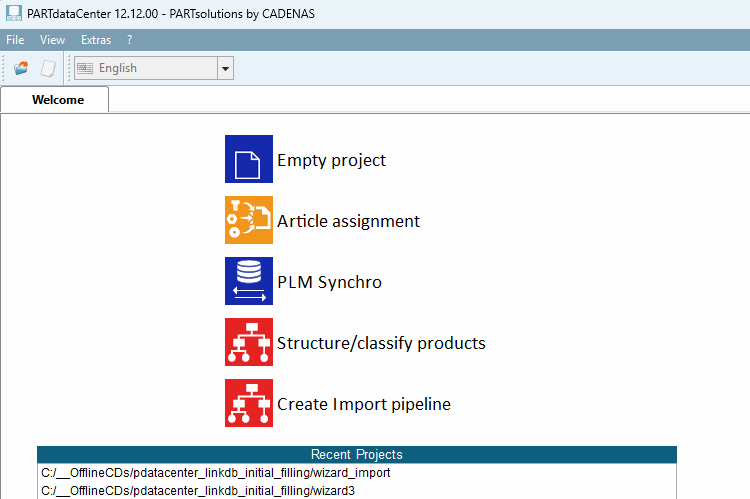
PARTdataCenter contains the following functions / modules:

Explanations of higher-level functionalities such as Pipeline, Dashboard, etc. can be found at Section 1.5, “ PARTdataCenter: Reference / General functions”.