1.3.
Structure/classify products
1.3.2. Create new
catalog |  |
| Prev | Next |
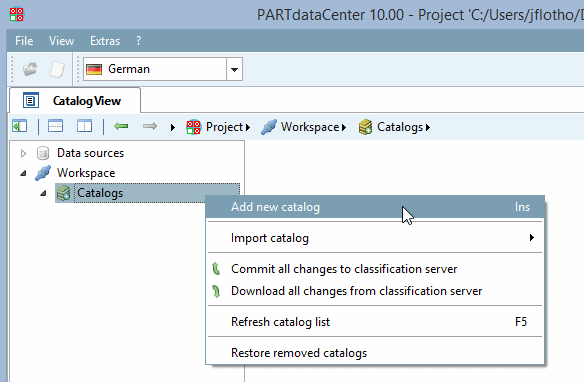
You can create a completely new catalog. To do this, click on the context menu command Add new catalog under Workspace -> Catalogs.
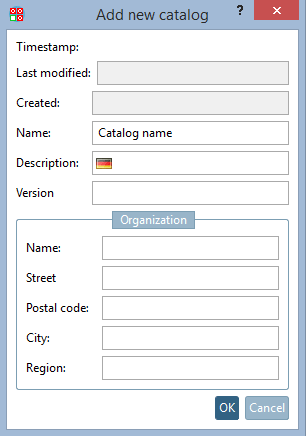
-> The same-named dialog box opens.
Enter at least the catalog name and confirm with .
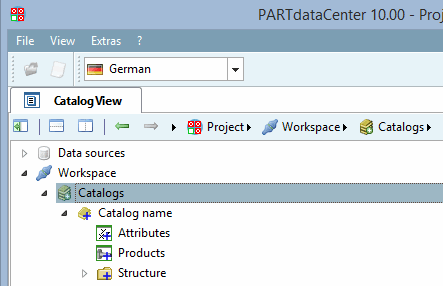
The catalog is created with the categories Attributes, Products and Structure.
Attributes (class characteristics) correspond to table variables (in LinkDB or attribute table) in PARTsolutions
Detailed information on the attributes view [Attributes] can be found at Section 1.3.4, “ Attributes " category”.
Products correspond in PARTsolutions table rows (possibly versions of the same component or different parts)
Detailed information on the product view [Products] can be found at Section 1.3.5, “Category "Products "”.
You create the classes under Structure:
Detailed information on the creation of the catalog structure can be found under Section 1.3.6, “ Structure " category”.
Also see Section 1.3.12, “Background information on the mapping logic between PARTwarehouse and PARTsolutions ”.