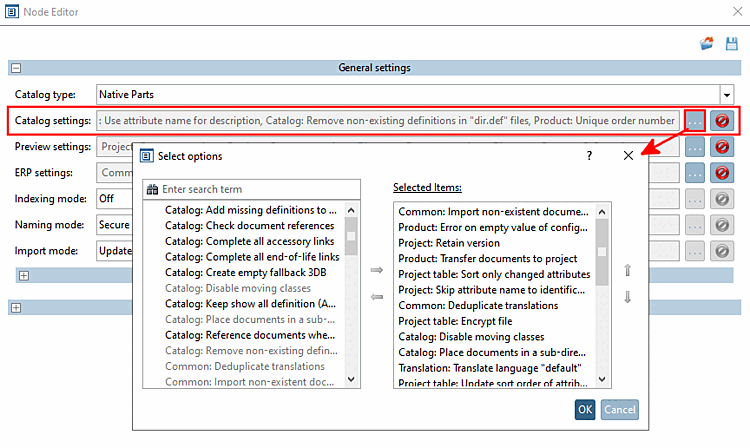
1.7.1.1.2.  Catalog settings (list of items relevant for own parts catalogs)
1.7.1.1.2.1. General: Deduplication of translations [Default]
1.7.1.1.2.2. General: Import non-existent documents
1.7.1.1.2.3. Catalog: Place documents in subdirectory
1.7.1.1.2.4. Catalog: Removal of non-existent definitions in " dir.def" files [Default]
1.7.1.1.2.5. Catalog: Deactivate moving of classes
1.7.1.1.2.6. Product: Transfer documents to the project
1.7.1.1.2.7. Product: Ignore documents when moving
1.7.1.1.2.8. Product: Unique order number
1.7.1.1.2.9. Product: Error with an empty value of the configured order number attribute
1.7.1.1.2.10. Project: Removing the table restriction (legacy) [Default]
1.7.1.1.2.11. Project: Maintain version
1.7.1.1.2.12. Project: Omit assignment of attribute name to identification
1.7.1.1.2.13. Project table: Retain attribute definitions
1.7.1.1.2.14. Project table: Overwrite attributes with the same name
1.7.1.1.2.15. Project table: Use attribute names for description
1.7.1.1.2.16. Project table: Compress file
1.7.1.1.2.17. Project table: Encrypt file
1.7.1.1.2.18. Project table: Display identifying attribute
1.7.1.1.2.19. Project table: Sort only changed attributes
1.7.1.1.2.20. Project table: Sort only new attributes
1.7.1.1.2.21. Project table: Deactivate sorting of attributes
1.7.1.1.2.22. Project table: Update sort order of attributes only once
1.7.1.1.2.23. Parts selection: Deactivate sorting
1.7.1.1.2.24. Parts selection: Standard sorting
1.7.1.1.2.25. Translation: Translate language "default"

Open the catalog settings [Catalog settings] by clicking on ....

Catalog settings

Catalog settings

[Note]Note

By default, some elements are selected (activated) and can therefore be found in the dialog on the right under Selected elements.

Option left -> deactivated

Option right -> activated

The elements listed below are relevant for own parts catalogs. Items for purchased parts catalogs are missing. The list is in alphabetical order.