1.8.2. Examples 1.8.2.2. Example 2:
Set import path via “DTO“ |  |
| Prev | Next |
Another example how to set the import path when products are available:
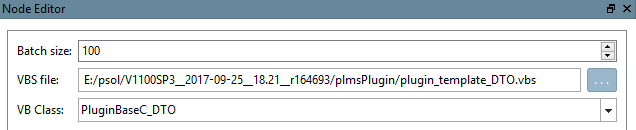
Create a VBS filter node (somewhere in the pipeline after the converter has run ). Set VBS file (plugin_template_DTO.vbs) and VB Class (PluginBaseC_DTO).
Add the following code to the function DTO:
 ' Create new classification
  Dim classification As PSolUnitProxy.prxClassification_1
  Set classification = CreateObject("wh.Classification_1")
  classification.SystemId = "customID"

  ' Prepare attribute.
  Dim newAttr As PSolUnitProxy.prxProductAttribute_1
  Set newAttr = CreateObject("wh.ProductAttribute_1")

  ' Prepare the attribute value.
  Dim newAttrVal As PSolUnitProxy.prxAttributeValue_1
  Set newAttrVal = CreateObject("wh.AttributeValue_1")
  newAttrVal.Text = "newtestpath/whatever“ ‘ Import Path for parts

  newAttr.Name = "imppath_"
  newAttr.Group = "imppath"
  Set newAttr.Value = newAttrVal

  ' Add Attribute to classification
  classification.addAttributeValue(newAttr)
  ' Add classification to product
  product.addClassification(classification)
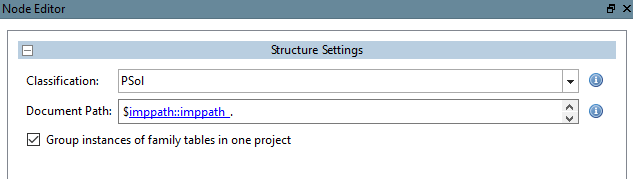
Edit the structure node in PARTdataCenter.
Document Path: imppath (Group of attribute); imppath_ (Name)
| In classification: |
   "SystemId": "customID",
   "AttributeValue": [
       {
           "Name": "imppath_",
           "Group": "imppath",
           "Value": {
               "Text": "newtestpath2/whatever"
           }
       }
   ]
|