1.10. Distributed
services 1.10.2.
PARTdataCenter: Activation of distributed services |  |
| Prev | Next |
To call up the pipeline via Start on Server
 if you have previously made a corresponding configuration and activated "Distributed services".
Open the desired process created before (with the help of the Wizard).
The distributed services must now be activated on the corresponding pipeline node (download service and/or conversion service ).
Click on the Enable/disable distributed calculation icon in the tooltip on the right above the node .
.
-> Once you have clicked on the icon, it is displayed directly beside the node.
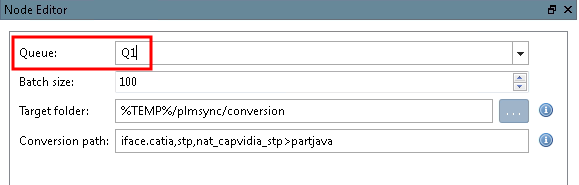
In the node editor [Node Editor], select the queue that you previously created in Psworker in the list field under Queue.
| ||||
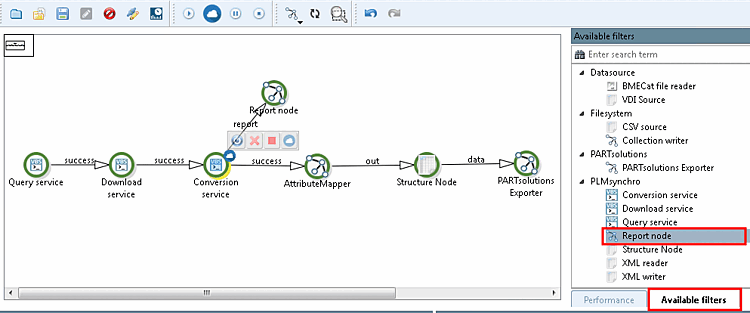
Optionally, you can also add a report node to the pipeline. This allows you to detect and rectify any errors that occur.
Open the Available filters tab page.[13]
You will find the Report node filter under PLMsynchro. Drag the filter into the process.
Drag an edge from the conversion service to Report Node.
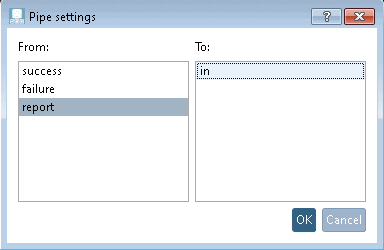
-> The Line settings [Pipe settings] dialog box opens.
Start the
process by clicking on .
If a pipeline with distributed tasks is running, you can track the current status in the dashboard. See Section 1.10.3, “Dashboard”.


![[Note]](images/note.png)