1.1.1. Start 1.1.1.1. Activate PARTwarehouse service for article assignment
|  |
| Prev | Next |
You only need the following description for multi-user operation; no further precautions need to be taken for item assignment [Article assignment] for single-user use.
Installation of PARTsolutions and the respective catalog (e.g. Standard catalog)
You will find the file create_tables.sql on the installation medium at tools\databases\Partwarehouse.
Enter the connection string under $CADENAS_SETUP\partwarehouse enter the connection string in the configuration file pwserver.cfg.
ConnectionString=DRIVER={SQL Server Native Client 11.0};UID=pwserver;LANGUAGE=us_english;
 DATABASE=PWServer;WSID=PROG-DEV091;APP={Microsoft® Windows® Operating System};
SERVER=TINPWTEST02;Uid=pwserver;Pwd=start1234;
DATABASE=PWServer;WSID=PROG-DEV091;APP={Microsoft® Windows® Operating System};
SERVER=TINPWTEST02;Uid=pwserver;Pwd=start1234;
Make the following change at %cadenas_setup% -> "pappserver.cfg":
Search for the key “Services” and add the value “PartWareHouseService” as last value separated by comma.
Services=all,AnalysisService,PartWareHouseService
%appdata%\cadenas\partsolutions the configuration file partdatacenter.cfg:
For a locally executed article assignment, select the Use local AppServer option in PARTadmin -> AppServer Client [AppServer client] category.
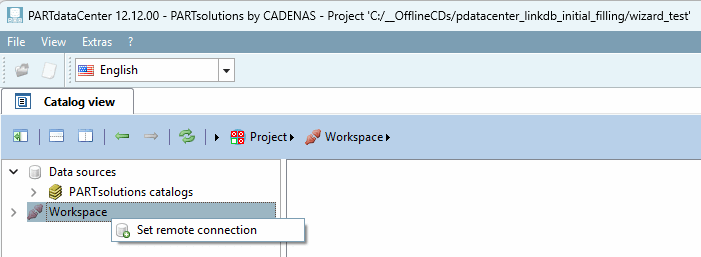
Under Workspace, click on the context menu command Set remote connection. (If the command is not displayed, restart the computer if necessary)
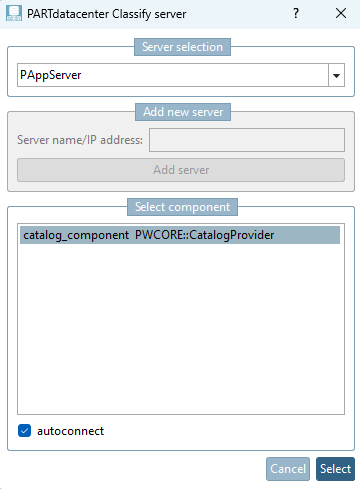
-> The PARTdatacenter classification server [PARTdatacenter Classify server] dialog box opens.