1.3.
Structure/classify products
1.3.11. Roles /
Rights
|  |
| Prev | Next |
Roles and rights are assigned via a configuration file $CADENAS_SETUP/partwarehouse/accessrights.cfg
assigned.
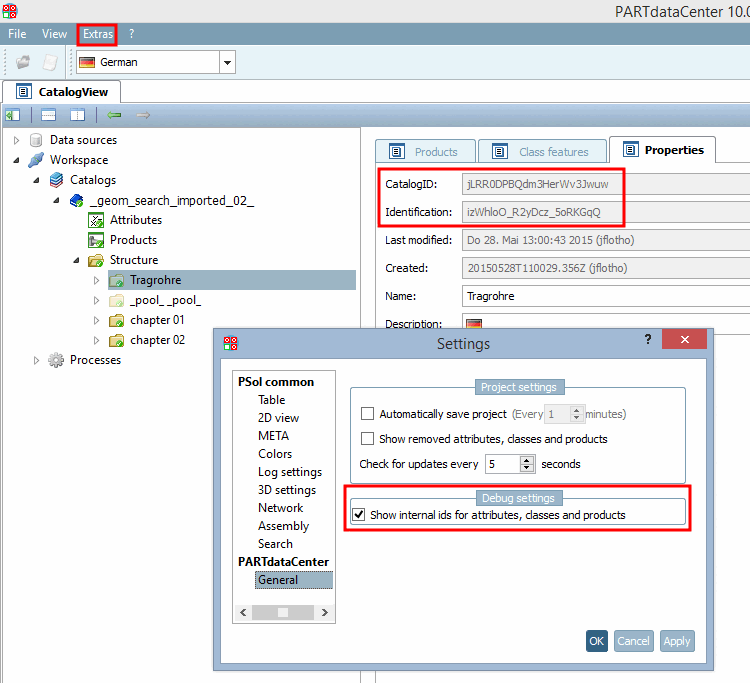
To make specific settings for the catalog and subdirectories, you need the internal IDs CatalogID and Identification.
Open the Settings dialog under Extras -> Settings [Settings...]....
Under Show internal identifiers for attributes, classes and products [Show internal ids for attributes, classes and products], activate the checkbox.
-> On the Properties tab page, you will now also see the Catalog ID [CatalogID] and Identification fields. You will need this additional information for settings in the configuration file.
Block: The block declaration is a combination of roll and catalog.
[<Rolle>.<Katalog>]
Objects ( keys ) for which rights (values) can be defined:
The possible rights (values ) are (single or comma-separated several or all)
For example, you can set minimal rights (only read access) as default:
[default]
catalogs=read
attributes=read
products=read
classes=read
The "Admin" role gets full access to all catalogs.
[admin.*]
catalogs=add,modify,delete,read,export
attributes=add,modify,delete,read
products=add,modify,delete,read
classes=add,modify,delete,read
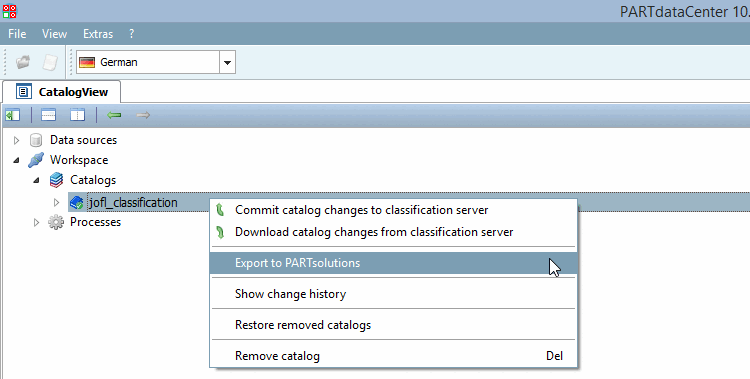
The "Export to PARTsolutions " command is only displayed if the value "export" is set in the "catalogs" key (on the server).
All roles get access for a certain catalog.
[*.jLRR0DPBQdm3HerWv3Jwuw]
catalogs=read
attributes=read
products=read
In addition to catalog also subdirectories can get specific access conditions.
subtree.izWhloO_R2yDcz_5oRKGqQ=add,modify,delete
[werk1.jLRR0DPBQdm3HerWv3Jwuw]
attributes=add,modify,delete
products=add,modify,delete
One certain role and all catalogs + specification only for products
[werk1.*]
products=add,modify,delete
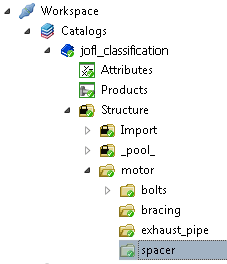
If there is only read access in the structure tree the "lock" icon is displayed.