Chapter 1.
PARTdataCenter
1.1.
Article assignment (initial filling of the LinkDB)
|  |
| Prev | Next |
Would you like to display data such as article number, description texts, release status, material, surface, stock, prices, etc. from your ERP and PDM system in 3Dfindit / PARTdataManager?
This data must then be linked to the corresponding standard and purchased parts in the PARTsolutions LinkDB.
ERP/PDM system are able to export article data in the form of a CSV file.
The PARTdataCenter module can then automatically create the link between PARTsolutions characteristic attribute table and the corresponding CSV information. The percentage of data that can be processed automatically depends on the data quality. You can use various filters to display all products that have not yet been clearly assigned and process them in a targeted manner. The user interface is also designed so that links can also be created manually if required.
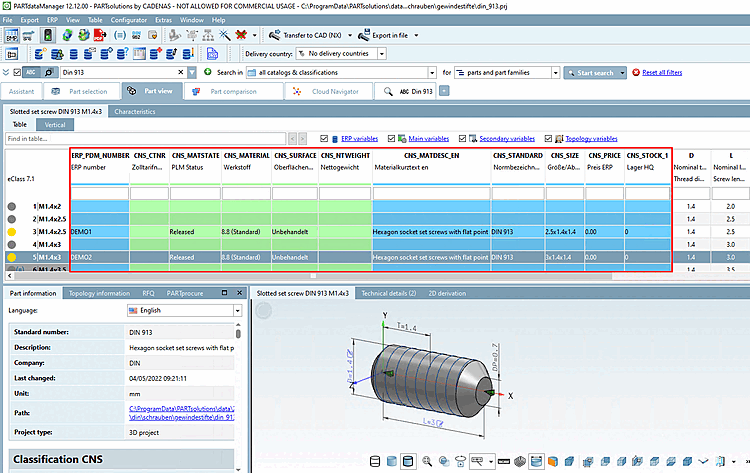
Exemplary result in PARTdataManager. Although the ERP number column is the most important identifier, any amount of information from third-party systems such as description, material, price, stock, etc. can be displayed after appropriate preparation of the LinkDB.
These are the most important sections for a first introduction:
Dimension search from A to Z (without "Optional settings ...")
Customer administration, ERP consultant
| ||||
[a] Generally: Specific parameters to determine the characteristic | ||||
| ||||
[b] You can find an example of this at Section 1.1.8.2, “ Article number search with regular expression”. | ||||
LinkDB connection must be possible. As an alternative, product assignments / link information can be saved in a CSV file in an intermediate step and later be imported into the LinkDB.
The PARTsolutions target catalog has to be installed (for the following examples mostly the Standards catalog).
![[Important]](images/important.png)
![[Note]](images/note.png)