1.5.2.4. Available filters (nodes) 1.5.2.4.2.
Custom algorithm
|  |
| Prev | Next |
The Custom algorithm node is used if no suitable node exists for the desired action. In this way, special tasks can be completed with little effort.
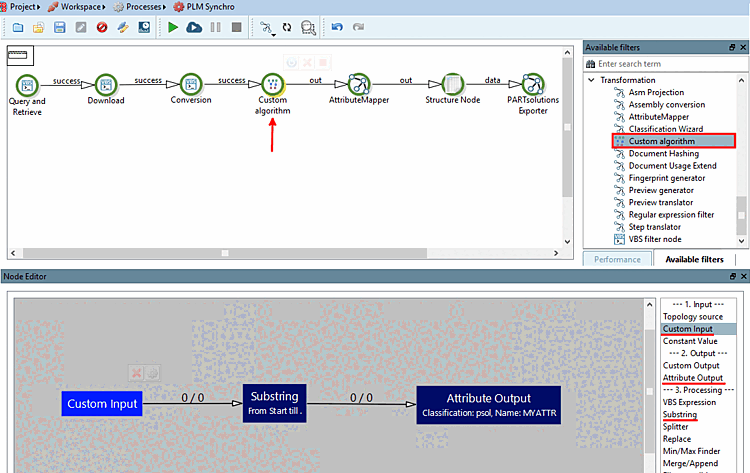
To do this, use the Custom algorithm node in the Available filters docking window under Transformation.
Example: You want to remove the file extension from the document name.
Drag the Custom Algorithm [Custom algorithm] node into the pipeline between Conversion and Attribute Mapper [AttributeMapper] (in this case).
Drag the required "blocks" into the node editor [Node Editor]. These are User-defined input, Substring and Attribute output [Attribute Output].
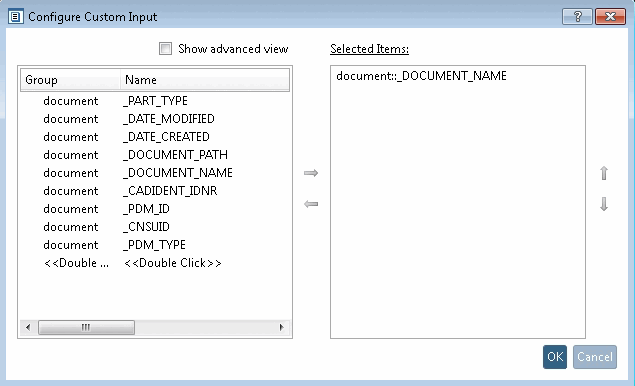
Via double-click on the respective element, open the corresponding dialog.
User-defined input: Input is the document name.
Substring: An operation is to be performed on a substring.
The setting in the following figure means:
Use substring from the beginning to last occurrence before the dot.
Assembly.iam" then becomes "Assembly".
Output attribute [Attribute Output]: A target classification [Target Classification] and a target attribute [Target Attribute] are assigned to the output.
![Configure substring [Substring]](resources/img/img_0ef917416e164bf19df772bde11105f1.png)
![Configure output attribute [Attribute Output]](resources/img/img_44b90254d7aa4736bed661468360177a.png)