1.8.2. Examples 1.8.2.1. Example 1:
Set import path via “pdmProxyPdmDocumentI“ |  |
| Prev | Next |
A small example of setting the import path of an item (using pdmProxyPdmDocumentI).
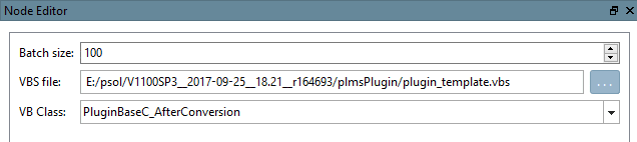
Create a VBS filter node directly after the conversion service (i.e. before the converter has run ). Set VBS file (plugin_template.vbs) and VB Class (_AfterConversion).
Go to the function „AfterConversion“
Add the following lines of code:
dim docProp = item.GetPropertiesObject()
dim pathProp = Application.GetObject("pdmProxies.ObjectFactory").createPdmProxiesObject
 ("pdmProxyPropertyObjectC", "Testpath/test")
pathProp.setType("STRING")
docProp.setProperty("path",pathProp)
("pdmProxyPropertyObjectC", "Testpath/test")
pathProp.setType("STRING")
docProp.setProperty("path",pathProp)
Get the root properties object (Return value pdmProxyAttributeContainerC)
dim docProp = item.GetPropertiesObject()
Create new pdmProxyPropertyObjectC & setValue and Type
dim pathProp = Application.GetObject("pdmProxies.ObjectFactory").
 createPdmProxiesObject("pdmProxyPropertyObjectC", "Testpath/test")
pathProp.setType("STRING")
Add pdmProxyPropertyObjectC to pdmProxyAttributeContainerC
docProp.setProperty("path",pathProp)
The converter.vbs
(executed during AttributeMapper ) converts the attribute path into a classification of the product.
| In classification: |
   "Name": "path",
   "Group": "document",
   "Value": {
                  "Text": "Testpath/test"
   },
                  "Id": "path"
   },
|
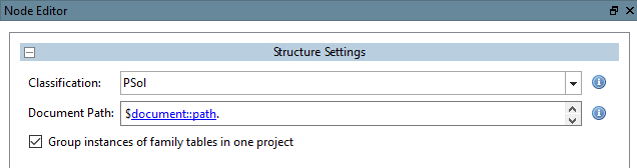
Edit the structure node in PARTdataCenter
Document path [Document Path]
$document::path.
(Group: document; Name: path --> see Classification PARTdataCenter)
Depending on the function used in the code, the appropriate group must be selected in the structure node.
dim docProp =
item.GetPropertiesObject() --> 
Mapping of functions to groups:
| GetPropertiesObject() | --> document |
| GetFileProperties() | --> file |
| GetCadAttributes() | --> cad |
| GetCadDimensions() | --> dimension |
| GetPdmAttributes() | --> pdm |
| GetCustomAttributes() | --> custom |