7.9.3. Tools

7.9.3.1. Basics for use
7.9.3.2. Default
7.9.3.2.1. Dialog box „Insert sketch“ (*.dbs-, *.skt or *.hsk files)
7.9.3.2.2. Dialog box „DXF Import“ (*.dxf file)
7.9.3.3. Delete
7.9.3.4. Shapes -> Points
7.9.3.4.1. Connection points for assembly construction
7.9.3.4.1.1. Connection points in general
7.9.3.4.1.2. Name conventions for Connection points and Insertion lines
7.9.3.4.1.3. Direction of connection points
7.9.3.4.1.4. Connection points at miters
7.9.3.4.1.5. Connection points at connection elements
7.9.3.4.1.6. Create Connection line
7.9.3.4.2. Connection points as Published elements for automatic placement in the CAD
7.9.3.5. Shapes -> Lines
7.9.3.6. Shapes -> Special
7.9.3.7. Shapes -> Circles
7.9.3.8. Shapes -> Arcs
7.9.3.9. Attributes
7.9.3.10. Modify -> Transform
7.9.3.11. Modify -> Trim (Part 1)
7.9.3.12. Modify -> Trim (Part 2)
7.9.3.13. Modify -> Threads
7.9.3.13.1. Cylindrical thread by length
7.9.3.13.1.1. Outer thread with example pin
7.9.3.13.1.1.1. Regular thread
7.9.3.13.1.1.2. Different pitches and derived automatic calculations for e.g. Row Label and Core diameter
7.9.3.13.1.2. Inner thread using the example of a cap nut
7.9.3.13.2. Conical thread by lengths
7.9.3.13.2.1. Regular thread
7.9.3.14. Tools in drawing mode
7.9.3.14.1. Text
7.9.3.14.2. Attributes
7.9.3.14.3. Attributes -> Dimensioning mode
7.9.3.14.4. Attributes -> Insert hatch
7.9.3.14.5. Attributes -> Polyline
7.9.3.14.6. Ellipses and Ellipse segments

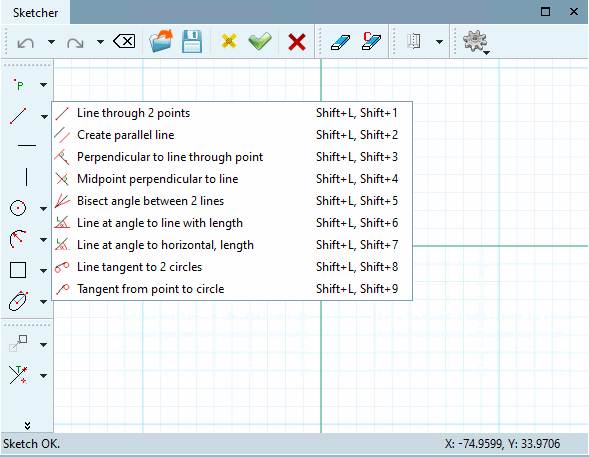
As of V12 tools are displayed in groups by default.

Example: Group "Lines" opened

Example: Group "Lines" opened

Clicking with the secondary mouse key at any place in a toolbar will open a menu to turn on and off the toolbars:

The following figure shows both the toolbar names and the group names as used if the settings option Group tools is activated.

Depiction of the functions with setting option "Group tools" activated

Depiction of the functions with setting option "Group tools" activated

By default, the function Group tools is on. The option to turn on and off can be found in the PARTdesigner under Extras menu -> Preferences... -> Sketcher (feat.).

The following figure shows the toolbars with names without grouping:
Depiction of the functions with setting option "Group tools" disabled

Depiction of the functions with setting option "Group tools" disabled
