7.9.3.2.
Default
7.9.3.2.1.
" dialog box (*.dbs, *.skt or *.hsk files)
|  |
| Prev | Next |
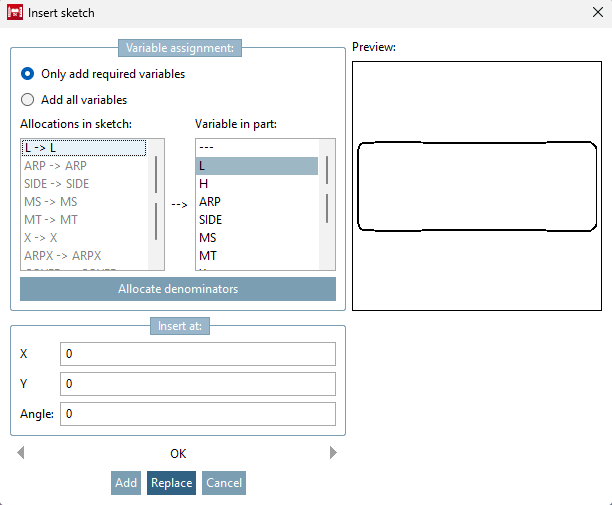
If you import a file of type *.dbs or *.hsk (*.skt), the Insert sketch window opens.
You can perform a comparison between the variables in the sketch to be imported and the currently opened PARTdesigner sketch . In the Assignment [Allocations in sketch] field in the sketch [Allocations in sketch] you can see the variables of the import sketch, in the Variable [Variable in part] field in the part [Variable in part] those of the current PARTdesigner sketch.
There are four options for assigning variables:
Only [Only add required variables] variables that are required for the sketch or component are added via Add only required variables [Only add required variables].
Add all variables adds all variables from the list without exception.
A manual assignment can be made by clicking in the list. To do this, first select a variable from the variable list of the sketch and then click on the variable from the component on the right-hand side to make an assignment.
Assigned variables then read e.g. A --> A.
If you do not want to assign a variable in the import sketch to do not other variable, combine it with the " --- " --- .
Identical variables from the sketch and component are automatically assigned to each other with .
Use Insert at to specify the insertion point ( X , Y ) and the angle [Angle] at which the import sketch is to be added to the current sketch.
You can see the 2D view of the sketch in the preview [Preview].
Use the button to add the import sketch to the currently open sketch.
Use the button to replace the currently open sketch with the import sketch.