7.9.3.15.
Tools in drawing mode
7.9.3.15.6.
Ellipses and ellipse segments
|  |
| Prev | Next |
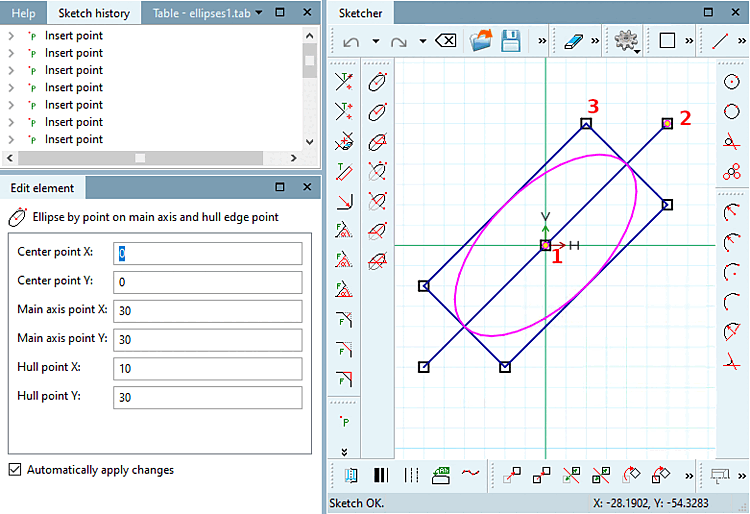
 Ellipse by point on main axis and hull edge
point [Ellipse by point on main axis and hull edge point]
Ellipse by point on main axis and hull edge
point [Ellipse by point on main axis and hull edge point]
Click on the icon and follow the instructions displayed in the status line:
Select center point [Choose center point]: As soon as the ellipse has been created, the point coordinates are displayed under Edit element under Center point X / Center point Y.
Select point on [Select point on main axis] main axis: As soon as the ellipse has been created, the point coordinates main axis point [Main axis point] X / main axis point [Main axis point] Y are displayed under Edit element.
The ellipse's orientation results from center point and main axis point.
Select envelope point [Select hull point]: Define a corner point of the rectangle to which the ellipse is inscribed.
In the Edit element docking window, you can subsequently adjust the values or variables of the individual parameters.
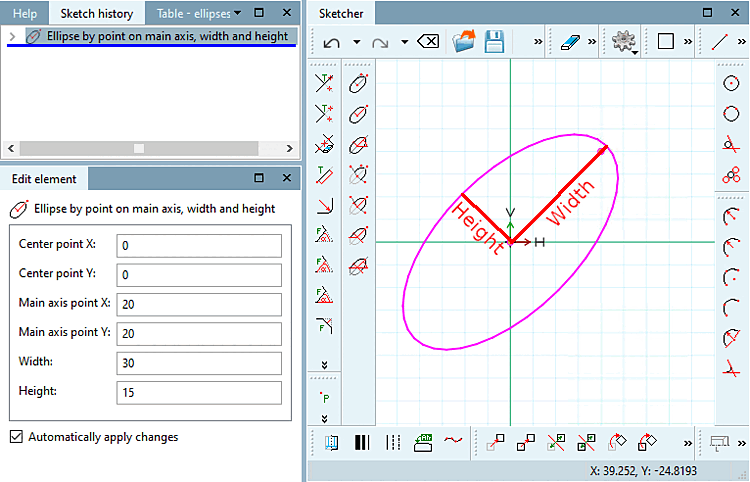
 Ellipse by point on main axis, width and
height [Ellipse by point on main axis, width and height]
Ellipse by point on main axis, width and
height [Ellipse by point on main axis, width and height]
Click on the icon and follow the instructions displayed in the status line:
Select center point [Choose center point]: As soon as the ellipse has been created, the point coordinates are displayed under Edit element under Center point X / Center point Y.
Select point on [Select point on main axis] main axis: As soon as the ellipse has been created, the point coordinates main axis point [Main axis point] X / main axis point [Main axis point] Y are displayed under Edit element.
The ellipse's orientation results from center point and main axis point.
Select dimensions [Select size]: Draw the ellipse with the desired width [Width] and height [Height].
In the Edit element docking window, you can subsequently adjust the values or variables of the individual parameters.
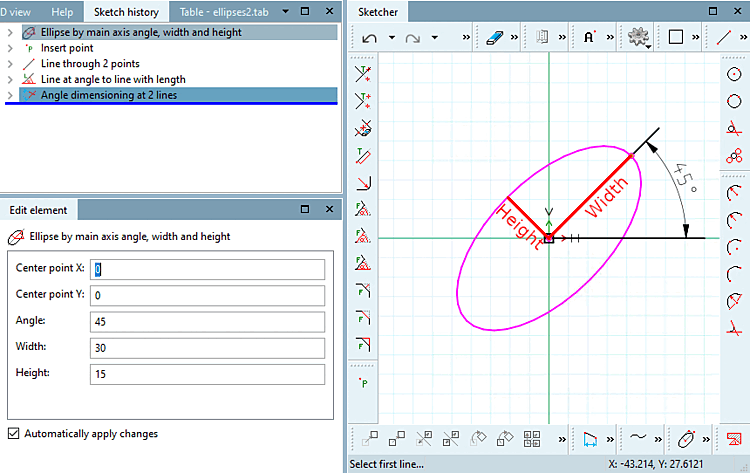
 Ellipse by main axis angle, width and
height [Ellipse by main axis angle, width and height]
Ellipse by main axis angle, width and
height [Ellipse by main axis angle, width and height]
Click on the icon and follow the instructions displayed in the status line:
Select center point [Choose center point]: As soon as the ellipse has been created, the point coordinates are displayed under Edit element under Center point X / Center point Y.
Select the angle of the [Select angle of main axis] main axis: Determine the angle in relation to the X-axis and the main axis of the ellipse.
Select dimensions [Select size]: Draw the ellipse with the desired width [Width] and height [Height].
In the Edit element docking window, you can subsequently adjust the values or variables of the individual parameters.
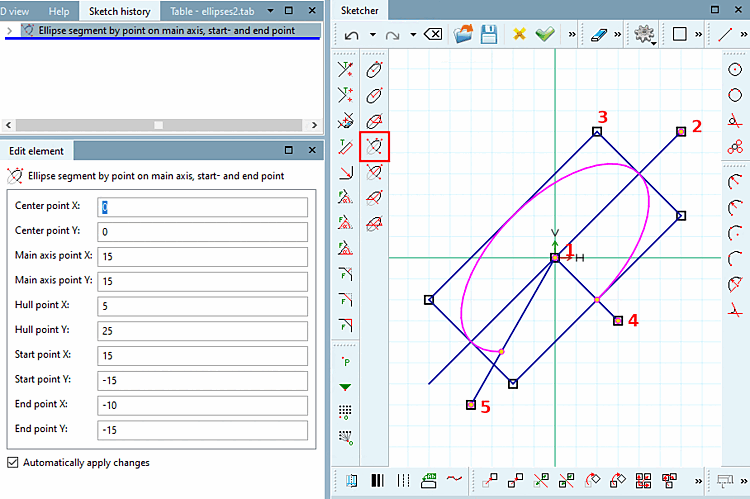
 Ellipse segment by point on main axis, start- and end
point [Ellipse segment by point on main axis, start- and end point]
Ellipse segment by point on main axis, start- and end
point [Ellipse segment by point on main axis, start- and end point]
Click on the icon and follow the instructions displayed in the status line:
Select center point [Choose center point]: As soon as the ellipse has been created, the point coordinates are displayed under Edit element under Center point X / Center point Y.
Select point on [Select point on main axis] main axis: As soon as the ellipse has been created, the point coordinates main axis point [Main axis point] X / main axis point [Main axis point] Y are displayed under Edit element.
The ellipse's orientation results from center point and main axis point.
Select envelope point [Select hull point]: Define a corner point of the rectangle to which the ellipse is inscribed.
Select the starting point [Choose start point]: The ellipse segment begins at the intersection of the line between the center of the ellipse and the starting point and the ellipse.
Select end point: The ellipse segment ends at the intersection of the line between the ellipse center end point and the ellipse.
-> The segment located counterclockwise between 4) and 5) remains.
In the Edit element docking window, you can subsequently adjust the values or variables of the individual parameters.
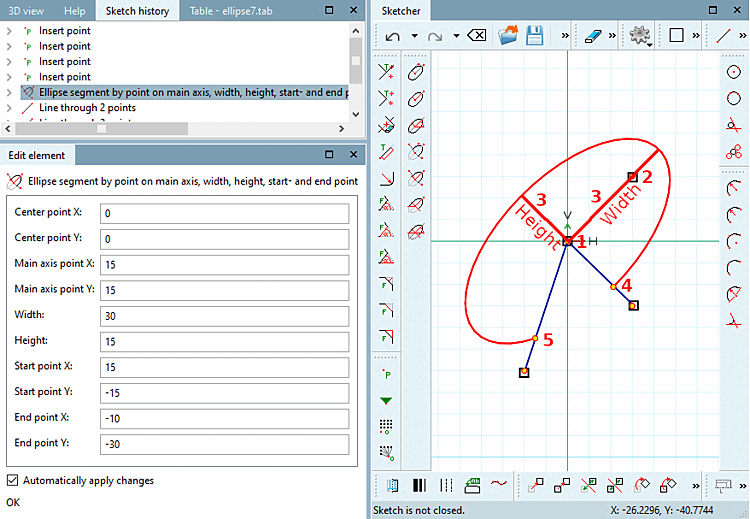
 Ellipse segment by point on main axis, width, height,
start- and end point [Ellipse segment by point on main axis, width, height, start- and end point]
Ellipse segment by point on main axis, width, height,
start- and end point [Ellipse segment by point on main axis, width, height, start- and end point]
Click on the icon and follow the instructions displayed in the status line:
Select center point [Choose center point]: As soon as the ellipse has been created, the point coordinates are displayed under Edit element under Center point X / Center point Y.
Select point on [Select point on main axis] main axis: As soon as the ellipse has been created, the point coordinates main axis point [Main axis point] X / main axis point [Main axis point] Y are displayed under Edit element.
The ellipse's orientation results from center point and main axis point.
Select dimensions [Select size]: Draw the ellipse with the desired width [Width] and height [Height].
Select the starting point [Choose start point]: The ellipse segment begins at the intersection of the line between the center of the ellipse and the starting point and the ellipse.
Select end point: The ellipse segment ends at the intersection of the line between the ellipse center end point and the ellipse.
-> The segment located counterclockwise between 4) and 5) remains!
In the Edit element docking window, you can subsequently adjust the values or variables of the individual parameters.
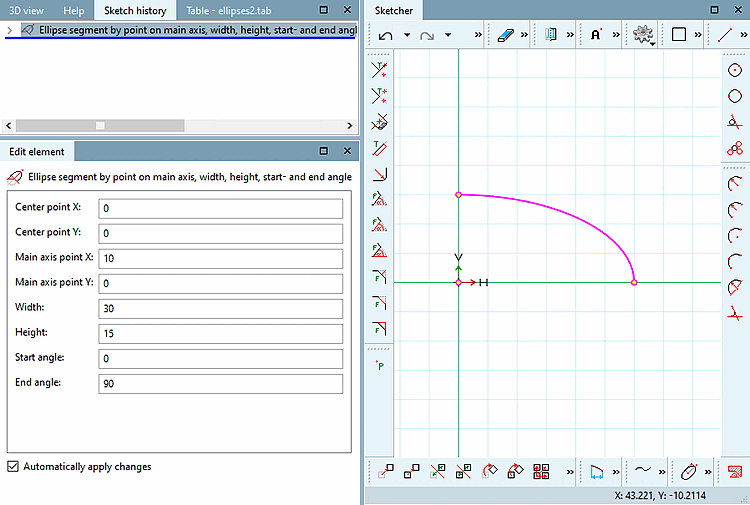
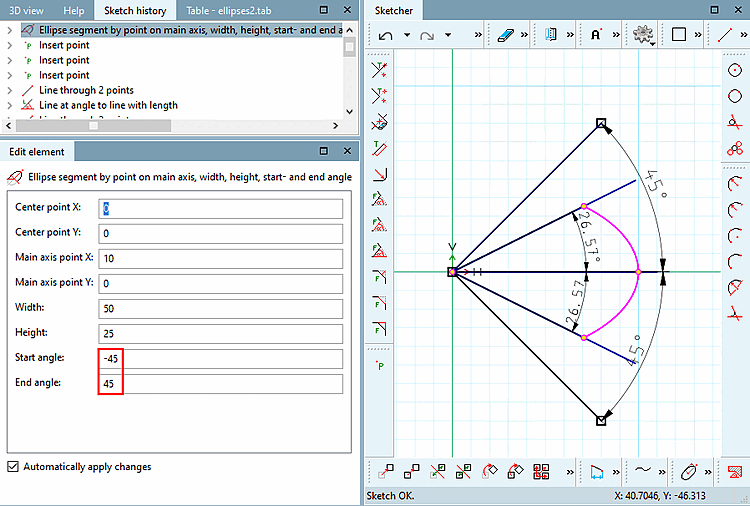
 Ellipse segment by point on main axis, width, height,
start- and end angle [Ellipse segment by point on main axis, width, height, start- and end angle]
Ellipse segment by point on main axis, width, height,
start- and end angle [Ellipse segment by point on main axis, width, height, start- and end angle]
Click on the icon and follow the instructions displayed in the status line:
Select center point [Choose center point]: The selected point is displayed in the dialog under Centre point X / Centre point Y.
Select point on [Select point on main axis] main axis: The selected point is displayed in the dialog under Main axis point X / Main axis point Y.
The ellipse's orientation results from center point and main axis point.
Select dimensions [Select size]: Draw the ellipse with the desired width [Width] and height [Height].
The start angle [Start angle] and end angle [End angle] are relative to the main axis. The angle is applied counterclockwise as usual.
In the Edit element docking window, you can subsequently adjust the values or variables of the individual parameters.
| ||||
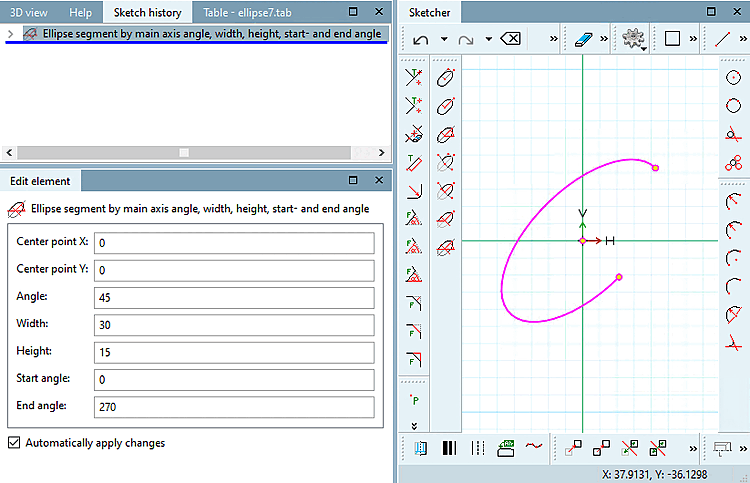
 Ellipse segment by main axis angle, width, height,
start- and end angle [Ellipse segment by main axis angle, width, height, start- and end angle]
Ellipse segment by main axis angle, width, height,
start- and end angle [Ellipse segment by main axis angle, width, height, start- and end angle]
Click on the icon and follow the instructions displayed in the status line:
Select center point [Choose center point]: The selected point is displayed in the dialog under Centre point X / Centre point Y.
Select the angle of the [Select angle of main axis] main axis: Determine the angle in relation to the X-axis and the main axis of the ellipse.
Select dimensions [Select size]: Draw the ellipse with the desired width [Width] and height [Height].
The start angle [Start angle] and end angle [End angle] are relative to the main axis. The angle is applied counterclockwise as usual.
In the Edit element docking window, you can subsequently adjust the values or variables of the individual parameters.
| ||||
!["Ellipses [Ellipses] " toolbar](resources/img/img_577889444e1d4a468b1f35c43b5489db.png)
![[Note]](images/note.png)