7.13.5. Docking window "Configurator " - Specify configuration

7.13.5.1. Context menu of the assembly
7.13.5.1.1. Open tree
7.13.5.1.2. Properties...
7.13.5.1.2.1. General
7.13.5.1.2.2. Type
7.13.5.1.2.3. Center point
7.13.5.1.3. Edit in PARTdesigner...
7.13.5.2. Parts" context menu - Insert part..
7.13.5.3. Context menu single parts
7.13.5.4. Context menu "Table restrictions "
7.13.5.5. " Value range assignments" context menu
7.13.5.5.1. Manual assignment
7.13.5.5.2. Automatic assignment
7.13.5.6. Context menu " Conditions "
7.13.5.6.1. "Condition properties " dialog box
7.13.5.6.2. Context menu of the "Condition 1 " or "Condition 2 " fields
7.13.5.6.3. Define condition - Example
7.13.5.7. Context menu of connection points
7.13.5.7.1. New rule
7.13.5.7.1.1. Properties
7.13.5.7.1.2. Positioning
7.13.5.7.1.3. Conditions
7.13.5.7.1.3.1. Conditions - Use only if applies
7.13.5.7.1.3.2. Conditions - Only use if
7.13.5.7.1.3.3. Conditions - Do not use the following rules if they are used
7.13.5.7.2. Paste
7.13.5.7.3. Context menu Attachment Point: Examples
7.13.5.7.3.1. Starting Position on Rotation
7.13.5.7.3.2. Combined Rotary and axial movements / assembly setup

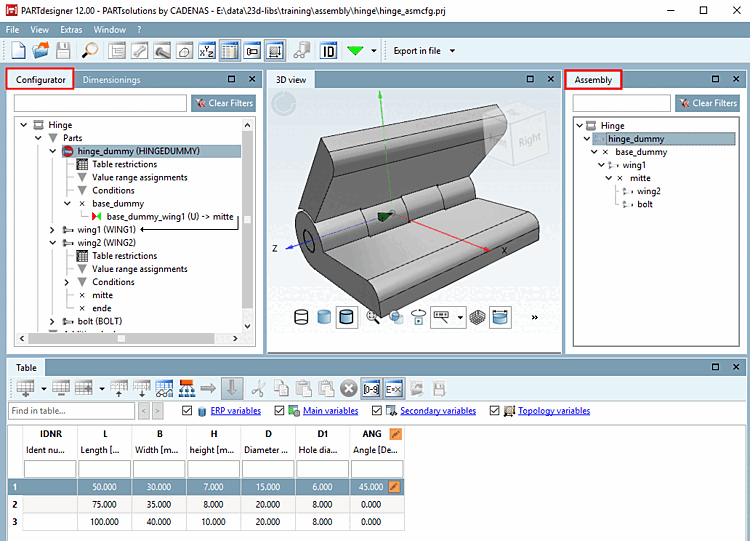
The set of rules that generates an assembly from individual parts is created in the docking window configurator [Configurator]. Context menus are used to define rules [Rules] for each connection point and conditions [Conditions] for each component.

The docking window Structure [Assembly] shows how the individual components are connected to each other and is used to select parts.

The docking window configurator [Configurator] and structure [Assembly] with their specific context menus are described below.