5.8.2.1.19.
Output
5.8.2.1.19.6.
Generate deeplinks
|  |
| Prev | Next |
The Create deeplinks [Generate deeplinks] function can be used to create deeplinks and thus link products directly to other pages and direct the user via this link to a special part or a part family on a PARTcommunity portal.
The function provides a CSV/Excel file and/or the deeplink "packed" in a QR code. To do this, fill in the fields in all dialog areas.
The function can also be used to write all table variables or a specific selection of them or project variables to a CSV (similar to the function Section 5.8.2.1.19.8, “ Create CSV table ”, but with more options). In this case, only the fields up to and including the Columns area need to be filled in.
Call: The call is made in the context menu on the catalog root element, any subdirectory or project under Output -> Create deeplinks [Generate deeplinks].
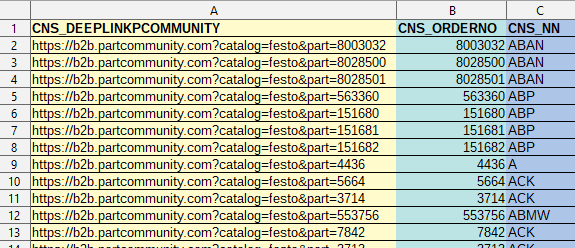
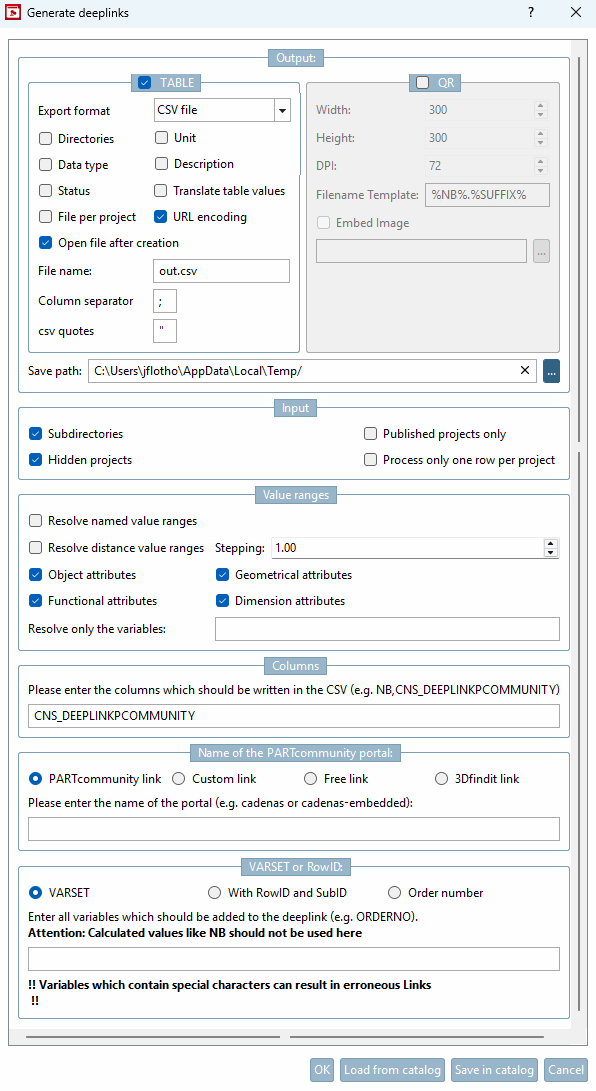
Deeplinks Generator [Deeplinks generator] dialog: The example output above was generated with settings as shown in the following figure.
Activate the checkbox next to TABLE and/or QR.
To link to your page, you can not only use deep links, but also QR codes. To do this, activate the QR checkbox.
Then for each deeplink an individual QR image is created and saved in the specified directory.
Target path [Save path]: Enter the target path for the directory in which the CSV file and the image file with the QR code are stored.
Determine which directories/projects you want to use for the input.
Value ranges (see Section 7.8.13, “ Value ranges ”):
Process distance value ranges [Resolve distance value ranges] / increment [Stepping]:
Processing of "from-to" value ranges
Example: For example, if HUB [0:100/0.1] is stated then that means the stroke can be selected in the range from 0 to 100 in steps of 0.1 mm.
When entering "1" each possible step within the value range is resolved, with "5", every fifth step, with "10" every tenth step, etc.
Information on this can be found under Section 7.8.14, “ Identification type ”.
Columns: Enter all the columns that should appear in the CSV file here.
When using the function as a deeplink generator, the entry "CNS_DEEPLINKPCOMMUNITY" is mandatory. Further columns can be specified optionally. (See output example above.)
CNS_DEEPLINKPCOMMUNITY | PARTcommunity-Link
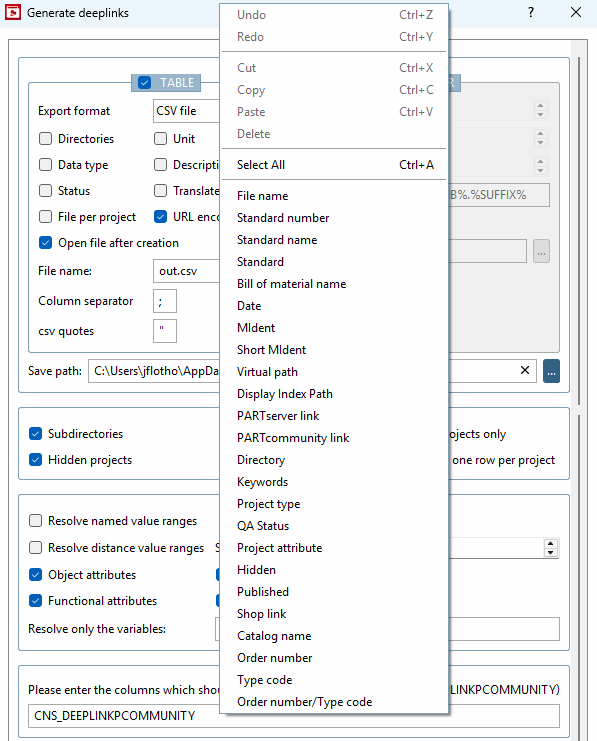
Following variables can be entered separated by comma in the input field. You don't have to memorize the exact variable names. Simply select them via context menu. Furthermore also the input of table variables or "CNS_" project variables is possible.
CNS_MIDENT (MIdent - unique string from all variables including value range variables)
CNS_DEEPLINKPCOMMUNITY (PARTcommunity Link [PARTcommunity link] )
CNS_PRJTYPE (project type [Project type] ) - all information from the PRJ file
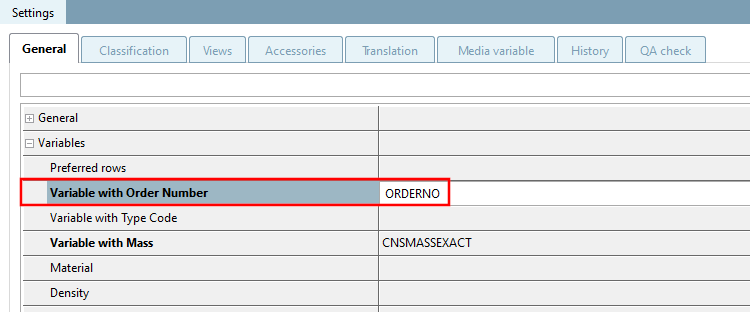
CNS_ORDERNO (order number [Order number] ) - The variable classified with order number [Variable with order number] in the Variable [Variable with order number] field is automatically used.
CNS_TYPECODE (type code [Type code] ) - The variable classified in the Variable with type code field is automatically used.
CNS_ORDERNO_TYPECODE (order number/type code [Order number/type code] ): ORDERNO is requested first; if this is an empty string, TYPECODE is used.
Name of the PARTcommunity portal:
PARTcommunity Link [PARTcommunity link]:
Please enter the name of the portal (e.g. cadenas or cadenas-embedded)
A PARTcommunity link is composed from the entered catalog name (e.g. "https://cadenas.partcommunity.com?info=..." ), followed by the corresponding parameters.
A domain can be specified (e.g. www.cadenas.de).
This option enables the creation of links to any portals.
The domain entered is placed in front of the parameters (e.g. "https://www.cadenas.de?info...").
User-defined link [Custom link]:
A complete freely definable URL is entered.
https://www.cadenas.de/?catalog=$CNS_CATALOG.part=$CNS_ORDERNO.
catalogname-embedded.partcommunity.com?catalog=catalogname&part=$CNS_ORDERNO_TYPECODE.
This creates a 3Dfindit link. It is not necessary to enter anything in the field below.
If you have set the type to 3Dfindit, the selection options in the VARSET or RowID field change to MIdent, MIdent short [Short MIdent] and Order number. Here too, it is not necessary to make an entry in the field below.
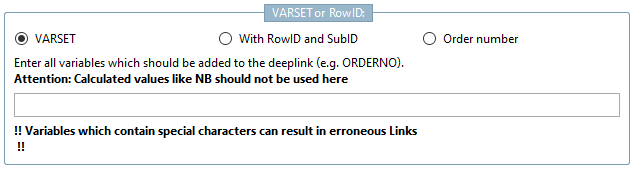
VARSET or Row [VARSET or RowID] ID:
Select an option from VARSET | With RowID and SubID | Order number.
The option enables the free entry of variables. If the uniqueness of a deep link is ensured (e.g. with the User-defined link [Custom link] option), the field can remain empty, otherwise uniqueness must be ensured by specifying suitable variables, unless it is only to be directed to part families.
The deeplink is assembled with the entered variables.
Calculated variables such as NB should not be used. The MIdent (CNS_MIDENT) for example, contains all variables including value range variables and so is suitable to ensure uniqueness.
It is best to use the context menu in the input field to select the desired variable.
With this option, uniqueness is ensured. Stating more variables in the input field is not required.
In PARTproject under Edit project -> General tab -> Variables menu item -> Variable with order number or Variable with type code, a corresponding variable must be classified.
Via order number or type code uniqueness is ensured. Input of other variables is not required.
If the command is executed, the file htmbatch_deeplinks.cfg is written to the catalog root directory and the settings from the dialog are saved there. Conversely, this file is read when you click on .
When the deeplinks.csv is generated (in the course of catalog publishing/generation), the settings from the htmbatch_deeplinks.cfg are used. For publishing, see Section 6.10, “
Publish catalog
”.
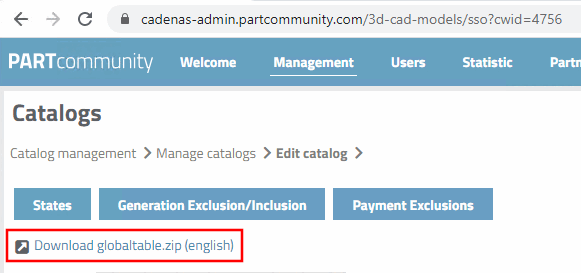
On the portal, you can download the deeplinks.csv packed as GlobalTable.zip and do not have to generate it again with the deeplinks generator [Deeplinks generator] (unless you have made changes and want the change file to be provided again the next time you publish).
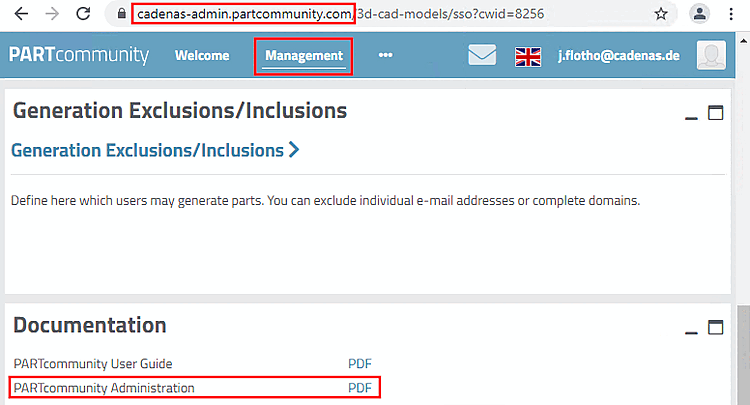
Details on any necessary portal settings can be found in the "PARTcommunity Administration" manual, which you can download/open at cadenas-admin.partcommunity.com-> Management.
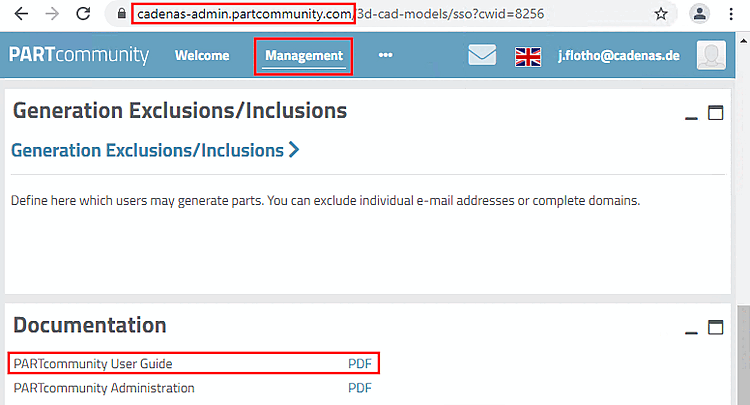
See PARTcommunity User Guide for this. To download/open the corresponding PDF file, go to cadenas-admin.partcommunity.com and select Management.

![[Note]](images/note.png)