5.8.2.1.19.
Output
5.8.2.1.19.8.
Create CSV table
|  |
| Prev | Next |
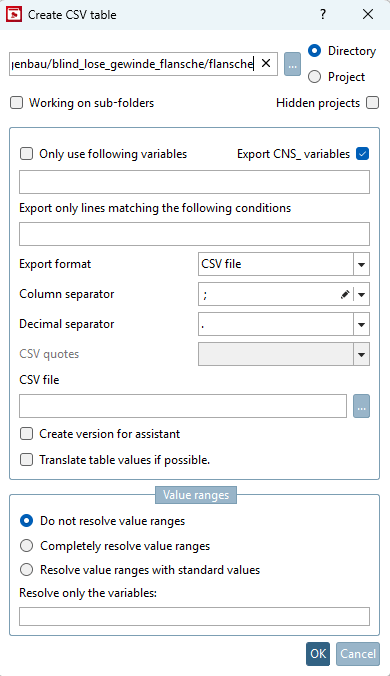
The contents of the *.tab files in a directory can be read out and listed in a separate file (text or Excel file).
The *.csv file generated in this way can in turn be compared with original company tables.
![[Note]](images/note.png) | Note |
|---|---|
In many cases, it is better to use the Create deep links [Generate deeplinks] function instead of Create CSV table. | |
If you don't make any settings, the table variables plus "NB", "LINA", "KT", "IDNR" and "NENN" will be exported.
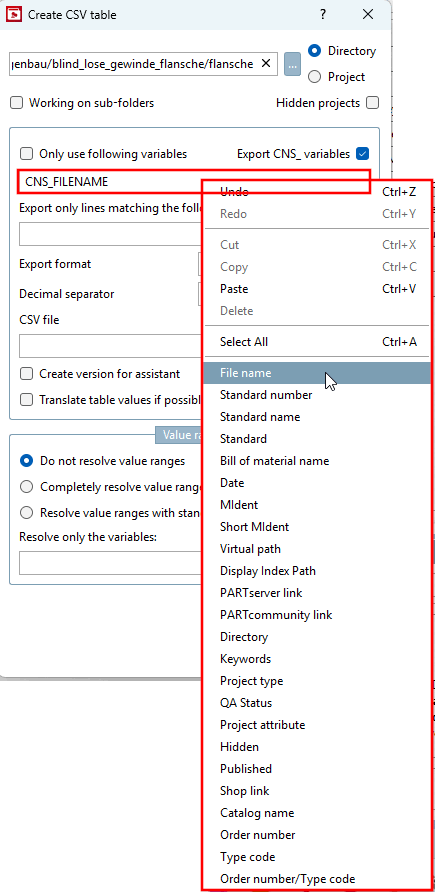
Only use the following variables [Only use following variables]:
If this check box is selected, only the variables written in the next edit line will be exported (and default variables if the 'Export CNS_* standard var' is checked).
If activated, export standard variables: CNS_FILENAME, CNS_NN, CNS_NB, CNS_NT, CNS_LINA, CNS_DATE, CNS_MIDENT. [If enabled, export default variables: CNS_FILENAME, CNS_NN, CNS_NB, CNS_NT, CNS_LINA, CNS_DATE, CNS_MIDENT.]..
Only export lines that fulfill the following condition [Export only lines matching the following conditions]: FORTRAN syntax must be used for this.
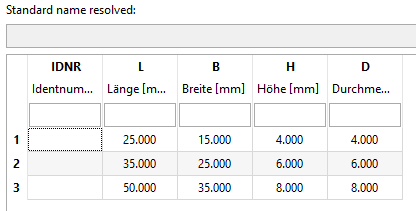
Example: If you only want to export the first two rows, use the following condition:
B.EQ.15.OR.B.EQ.25
CSV quotation marks [CSV quotes]: Only for export format "CSV"
Create version for assistants [Create version for assistant]:
If this option is enabled, use " as CSV quotes and do not create rows with unit, type, and description
If the generated file is NOT for an assistant, then quotation marks are not automatically set. Add quotation marks only on values which contain the separator.
Translate table values if possible [Translate table values if possible.]: