1.7.4. $CADENAS_SETUP
1.7.4.1. Overview of configuration files under $CADENAS_SETUP |  |
| Prev | Next |
General 3Dfindit configuration files
Settings for the 2D view in 3Dfindit/PARTdataManager
For details, see Section 7.11, “Docking window "2D derivation " - Create your own combination views (*.dw) ” in eCATALOG 3Dfindit.
Block [Search] > Key "CADGeoSearchDefaultFolder"
See Section 5.23.4, “Determine default CAD geo search folder (3dfconfig.cfg) ”.
DIN 962 controls additional information for bolts and nuts for certain applications
material.cfg (without ERP integration)
Client settings of the PARTapplication Server. See Section 1.4.5.8.2, “ AppServer Client: Configuration ”.
Server settings of the PARTapplication Server. See Section 1.4.5.8.1, “ AppServer Service: Configuration ”.
Settings for all 3Dfindit modules, especially PARTdataManager GUI settings
Configuration files for CAD interfaces
CAD-specific configuration files if<cadname>.cfg and ifacecommon.cfg. See Chapter 3, 3Dfindit - CAD Integration - Administration
.
Configuration files for ERP integration
General ERP settings. Most settings can be found in the user interface under PARTlinkManager -> Extras menu -> Configure ERP environment.
For features on Strategic Parts Management, see Chapter 5, Strategic Parts Management .
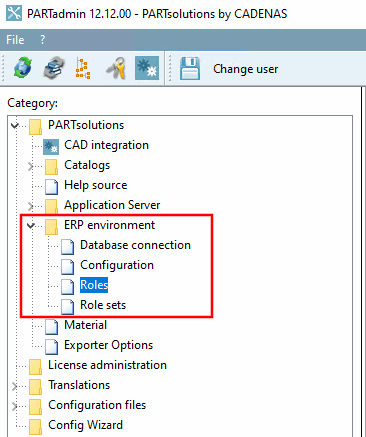
Contains groups/roles for individual users. In the user interface, you will find most of the setting options in the "Roles [Roles]" category [Category].
For features on Strategic Parts Management, see Chapter 5, Strategic Parts Management .
Contains the created users. In the user interface, you can find the corresponding settings in the category [Category] under ERP environment > Role records [Role sets].
For features on Strategic Parts Management, see Chapter 5, Strategic Parts Management .
The configuration file erpcustom.cfg is used to
adapt other ERP processes to the customer's needs (e.g. the
dialog when adding an ERP number to LinkDB).
material_assign.cfg (with ERP integration)
Material specification for export
See Section 5.12.1.8.1, “ Fill list field via configuration file ”.
Used to set up the nightly transfer of information from third-party systems to ENTERPRISE 3Dfindit.
Contains settings for export tables [Export tables] (PARTlinkManager -> Extras menu [Extras] -> Configure ERP environment -> Export tables Tabbed page).
Contains basic settings for the Update Manager [Update manager] that do not normally need to be adjusted. For details on the Update Manager [Update manager], see Section 5.17.3, “ Catalog update with ERP link - Fix assignment problems with Update Manager ”.
![Category "Roll sets [Role sets]"](resources/img/img_3e35a7cfdcdc4bcbb9b98dab51983467.png)