5.12.1.8.
selectionfile 5.12.1.8.1.
Fill list field via configuration file
|  |
| Prev | Next |
Any name
of the configuration file has been determined under erpcustom.cfg > USERDIALOG .
In the
named configuration file (e.g. material_assign.cfg )
what parameters in 3Dfindit / PARTdataManager in the dialog box
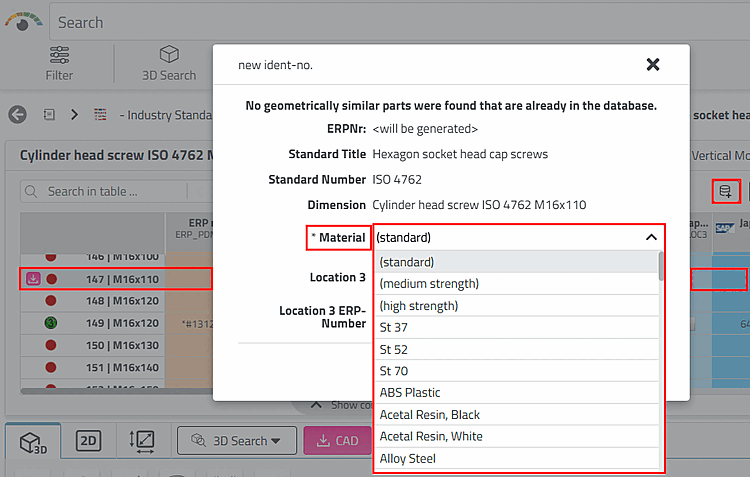
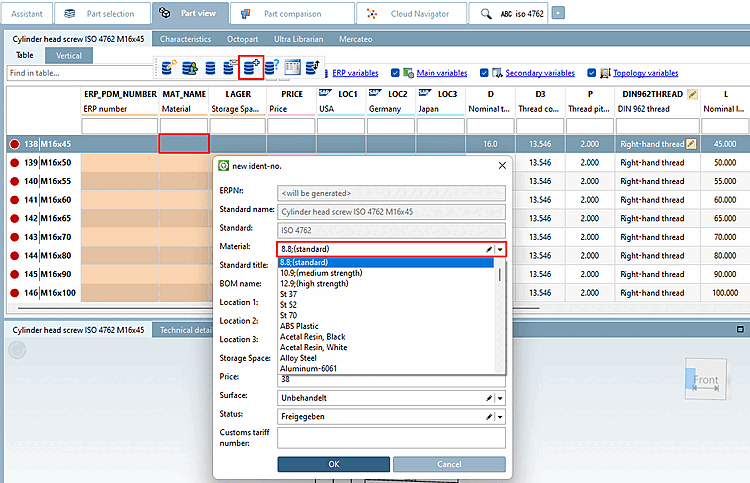
New identification number [new ident-no.] should be displayed. In the
In the case of material_assign.cfg , these are
for example, different materials.
When parts are transferred to the CAD system, the 3Dfindit material is mapped to the CAD system material so that the physical properties can be calculated in CAD.
The following shows an example of the content of the specified file. The block name with an asterisk is the fallback if no other blocks have been specified.
[*]
1=;Please select...
2=8.8;(Standard)
3=10.9;(mittelfest)
4=12.9;(hochfest)
5=St 37
6=St 52
If you use the entry Please select... entry, be sure to place a semicolon before the text to display an empty internal value. This will mark the field red after an if no valid entry has been selected. This behavior in 3Dfindit corresponds to the previous behavior in PARTdataManager.
The translation of Please select... is possible. It is only important to also enter the semicolon in the block heading.
[;Please select...]
default=Please select...
german=Bitte auswählen...
english=Please select...
Specification of further blocks:
You can set the information in other blocks to be catalog-specific; you can even set information for specific projects.
Sample content of the specified file:
[norm/din_en_iso/stifte/scherstifte/din_1.prj]
1=1.4301 (V2A)
2=1.4571 (V4A)
Information on transferring the material attribute to CAD can be found under Section 3.2.9, “Material mapping ”.
Information on including the material in the file name can be found under Section 3.2.7.2, “File name: set generation options ("FileName" key) ”. By default, existing material information is included in the file name.
![Dialog after clicking on "Add to link database [Add to link database]".](resources/img/img_1ef789f7174a46458246cb45ca7ba5c7.png)