1.4.5.8.
PARTapplicationServer - Configuration 1.4.5.8.2.
AppServer Client: Configuration
|  |
| Prev | Next |
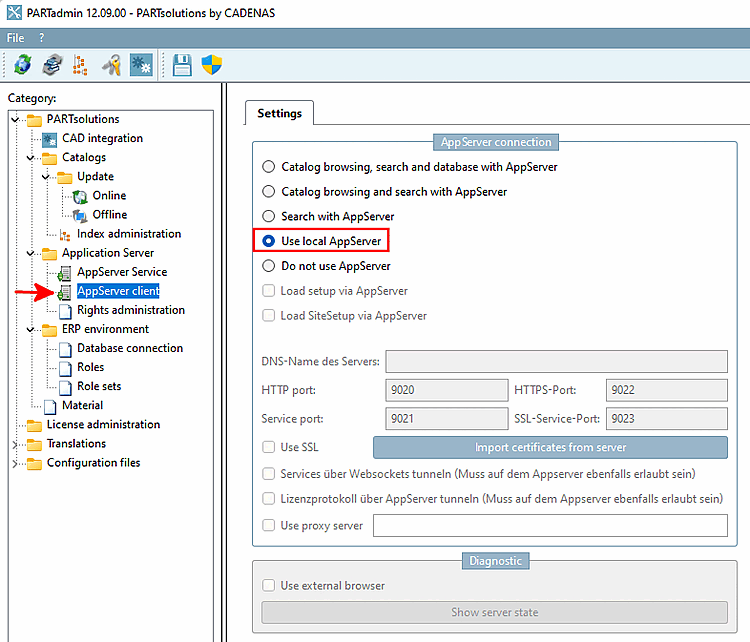
The AppServer Client configuration can be made in PARTadmin -> AppServer Client [AppServer client] category. [19]
Connection to the AppServer [AppServer connection]: Here you can define how clients should access the AppServer, i.e. via which ports, whether a local AppServer should be used, e.g. whether the AppServer should only be used for searching or also for catalog browsing, etc.
The following list explains the settings in detail:
Catalogs, search and database via AppServer [Catalog browsing, search and database with AppServer] and Catalogs and search via AppServer [Catalog browsing and search with AppServer]
PARTadmin > Category "AppServer Client [AppServer client]" > Selection "Catalogs, search and database via AppServer [Catalog browsing, search and database with AppServer]"
There is only one central data directory for multiple installations.
All accesses (catalog browsing and search [and for catalogs, search and database via AppServer [Catalog browsing, search and database with AppServer] also to the LinkDB]) - no matter from which location - run via the PARTapplicationServer.
Select one of these two settings if you are using 3Dfindit applications remotely without synchronizing the catalog data.
| ||||
-> All other setting options are deactivated (grayed out).
The
Using the local AppServer offers advantages over pdatamgr.exe . This one is running
to 64bit, which avoids possible memory problems.
The local app server is only used for searching, not for catalog browsing.
The AppServer is automatically started and stopped with 3Dfindit / PARTdataManager.
Do not use an AppServer [Do not use AppServer]
[19] The
For the AppServer Client configuration configuration file, see
under $CADENAS_SETUP/pappclient.cfg.
![PARTadmin > Category "AppServer Client [AppServer client]" > Selection "Catalogs, search and database via AppServer [Catalog browsing, search and database with AppServer]"](resources/img/img_d054fb76551546e7ae2766019ac6396b.png)
![[Note]](images/note.png)