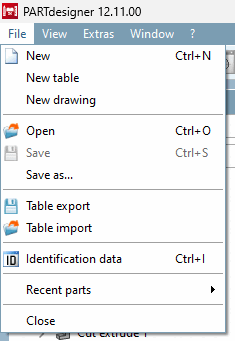
File management functions can be found both in the file menu [File] and in the standard toolbar [Default].
File " menu
Note
If the QA mode is active (PARTproject → Extras → Settings... [Preferences...] → General → Activate QA ), the menu items New, New table, New drawing [New Drawing] and Open are inactive. Direct opening or creating of files in PARTdesigner is not allowed. Editing must be started via PARTproject.

![[Note]](images/note.png)
![Standard [Default] " toolbar](resources/img/img_dfdf8199254849ea84a717accf14d56e.png)