7.18.9.
Identification data
7.18.9.2.
Table
|  |
| Prev | Next |
A newly created or changed table can only be saved and left, if Identification data have been given.
![[Note]](images/note.png) | Note |
|---|---|
| |
Details on single fields of the dialog box Identification data
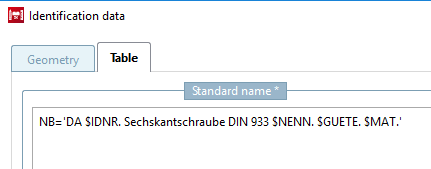
The standard designation (NB) [Standard name (NB)], for example, is made up of the standard number [Standard number], standard title [Standard title] and variable values, which are read dynamically from the table.
![[Important]](images/important.png) | Important |
|---|---|
Please absolutely regard the guidelines under Section 7.18.9.3, “ Guideline for NB, SHORTNB, LINA definition and type identification ”. | |
NB='ISO xy Bolt $D.x$L.'
| ||||
The (translated) wording of the standard designation [Standard name] (NB) appears when the corresponding part is called up in the PARTdataManager in the title bar of the 3D view.
When you open the Identification details [Identification data] window, the expression NB= '' is already available, but can also be inserted using the button.
Insert IF function in condition. For how it works, see Section 7.8.12, “ Attribute algorithms ”.
Insert ELSEIF function in condition. For how it works, see Section 7.8.12, “ Attribute algorithms ”.
You can check the entered expression for (syntactical) correctness via standard description.
The parts list designation (LINA) [BOM name (LINA)] is also transferred to the CAD system during export and appears there in the parts list.
| Important |
|---|---|
Please absolutely regard the guidelines under Section 7.18.9.3, “ Guideline for NB, SHORTNB, LINA definition and type identification ”. | |
Standard [Standard number] number and standard title [Standard title]:
Your company / company name where model / table has been created.
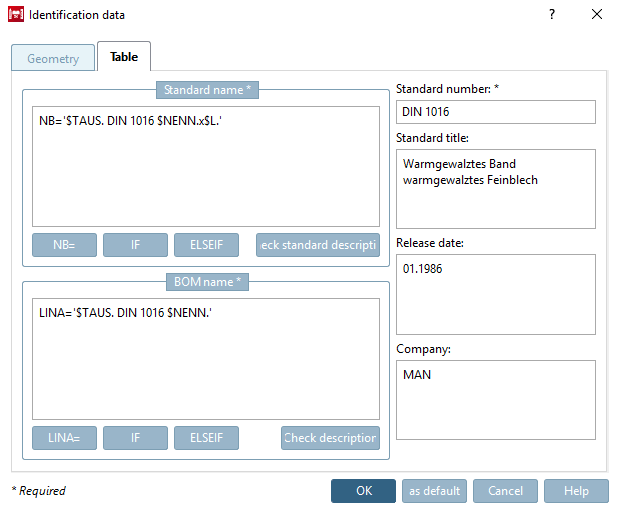
![Standard designation [Standard name] / component designation](resources/img/img_99e7c21280204ab7978b6cd0e8ec2084.png)
![Component name composed of standard number [Standard number] and standard title [Standard title]](resources/img/img_059d36023c584c4195e2dac3bdbe9c62.png)