5.12.9.30. Classify Electrical Parts - Tutorial

5.12.9.30.1. Connection points in general
5.12.9.30.1.1. Conditional connection points
5.12.9.30.1.2. Classify by using a prefix or regular expression
5.12.9.30.1.2.1. Classify a number of connection points in the same way
5.12.9.30.1.2.2. Classify groups of patterns
5.12.9.30.2. Defining the device orientation
5.12.9.30.3. Device type determination
5.12.9.30.3.1. Classify device type according to eClass
5.12.9.30.3.2. Classify device type according to CNS classification -> IEC Code 81346_2
5.12.9.30.4. Set Electrical Connections (CNS_CP|4|3) exemplified with a terminal
5.12.9.30.5. Class "Electrical Connection" (CNS_CP|4|3) -> Attribute "Connection EclassSymbolMap"
5.12.9.30.6. Electrical Connection" class (CNS_CP|4|3) -> "Connection name equivalences " feature
5.12.9.30.7. Special features for plugs
5.12.9.30.7.1. Unique "Identifier"
5.12.9.30.7.2. Connector Symbol (CNSELEK|4)
5.12.9.30.7.3. Frames
5.12.9.30.8. Mounting Description (CNS_CP|4|7)
5.12.9.30.9. Mounting Point (CNS_CP|4|6)
5.12.9.30.10. Associated Part [CNSELEK|5|4]
5.12.9.30.11. Testing in PARTdataManager
5.12.9.30.12. Most frequent error sources
5.12.9.30.12.1. Error source 1 - Missing global symbol
5.12.9.30.12.2. Error source 2 - Missing or wrong internal references
5.12.9.30.12.3. Error source 3 - Wrong configuration of interface

This training document explains how to add classifications to electrical components in PARTproject Elektro to add classifications to electrical components.

We assume that the project already exists, and the 3D model, table are created correctly.

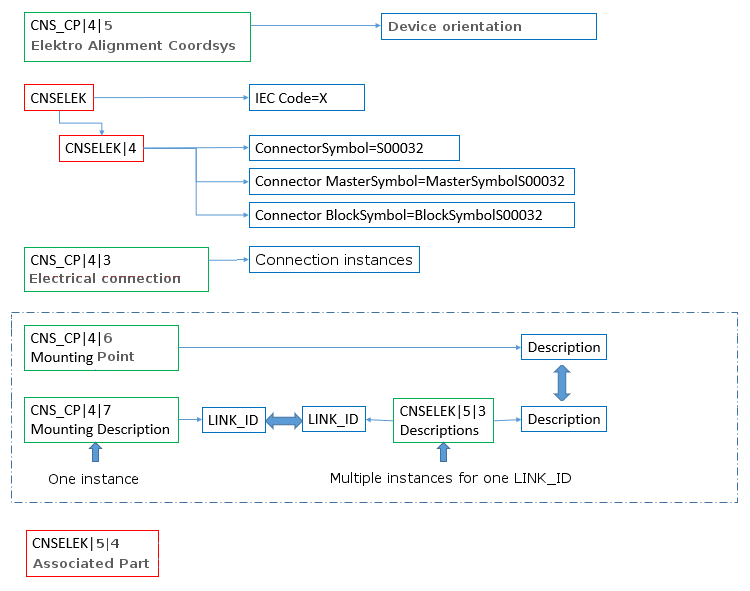
Following diagram gives an overview on the used classes.

Some classes are assigned globally to components, others are assigned to connection points (recognizable by the class prefix CNS_CP.