5.12.11.31. Classify
Electrical Parts - Tutorial 5.12.11.31.5. Class
"Electrical Connection" (CNS_CP|4|3) -> Attribute "Connection
EclassSymbolMap" |  |
| Prev | Next |
5.12.11.31. Classify
Electrical Parts - Tutorial 5.12.11.31.5. Class
"Electrical Connection" (CNS_CP|4|3) -> Attribute "Connection
EclassSymbolMap" | |
| Prev | Next |
The correct symbol is assigned to the component using the EclassSymbolMap connection feature.
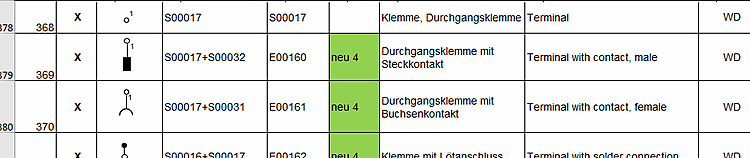
A list of the CAx_function symbols used in ECLASS can be found on the website http://wiki.eclass.eu/wiki/CAx_Funktionssymbole. Take the symbol designation from this list.
Following example uses the symbol S00017.
The value of Connection EclassSymbolMap looks like this: S00017||1||1
                             Symbolbezeichnung    ||  Ordnungszahl    ||   Pin-Nummer
--------------------------------------------------------------------------------------
Connection EclassSymbolMap         S00017         ||       1          ||        1
A double pipe symbol is used as separator.
If a symbol occurs only ONCE in a component, the ordinal number is 1 . If the same symbol occurs several times, the ordinal number is incremented.
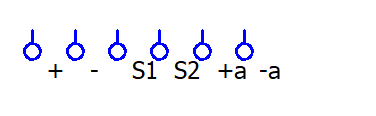
Terminal with 6 contacts (=6 connection points) of the same type.
The symbol is six times S00017. Each of these contains only one pin. The Connection EclassSymbolMap feature should therefore look like this:
| Attachment point name | EclassSymbolMap |
| + | S00017||1||1 |
| - | S00017||2||1 |
| S1 | S00017||3||1 |
| S2 | S00017||4||1 |
| +a | S00017||5||1 |
| -a | S00017||6||1 |
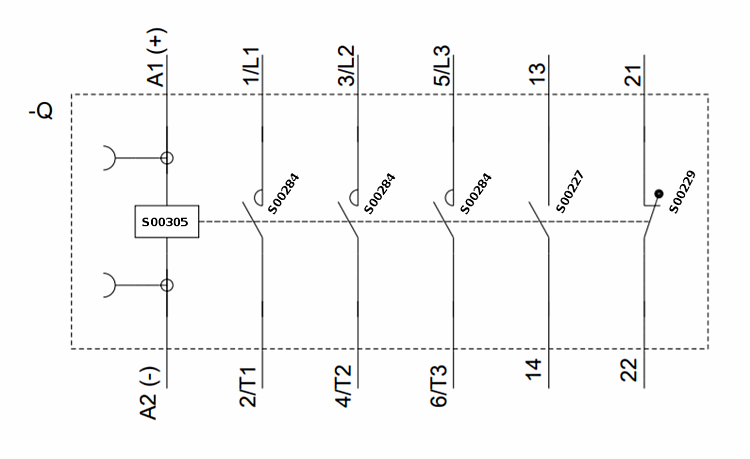
Following figure shows a device that contains several different symbols.
The symbol for the coil is ONE time S00305. This means that the ordinal number remains 1 in all cases
Explanation on main contact S00284
The main contact occurs 3 times. So the ordinal number is incremented from 1 to 3. Each main contact has 2 pins. They are incremented at each main contact (=symbol).
Explanation on "make contact" S00227
The "make contact" only occurs one time and has two pins. That means the ordinal number is always 1, the pins are incremented.
Explanation on "break contact" S00229
The "break contact" only occurs one time and has two pins. That means the ordinal number is always 1, the pins are incremented.
Connection EclassSymbolMap should therefore look like this: