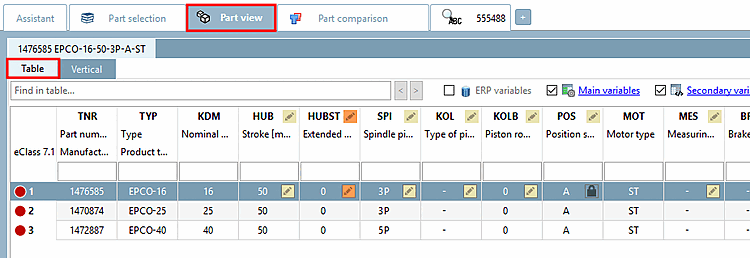
3.1.7.1. Determine characteristic in "Table" view

3.1.7.1.1. Full-text search in table
3.1.7.1.2. Show/hide variable groups
3.1.7.1.3. Call up table settings
3.1.7.1.4. Columns with value range fields
3.1.7.1.5. Preview images adjustable in size
3.1.7.1.6. Show preview images in parts view per line
3.1.7.1.7. Show graphics in table
3.1.7.1.8. Ascending/descending column sorting
3.1.7.1.9. Adjust column width
3.1.7.1.10. Show topology variables in table
3.1.7.1.11. Filter table
3.1.7.1.11.1. Filter table by search
3.1.7.1.11.2. Filter table via input fields in column header
3.1.7.1.11.3. Table filtered by accessory part
3.1.7.1.11.4. Use preferred rows filter
3.1.7.1.11.5. Example: Using filters
3.1.7.1.11.6. Parts that should be avoided
3.1.7.1.11.7. DIN 962 option
3.1.7.1.11.8. Hide columns
3.1.7.1.12. Additional information /-functions
3.1.7.1.13. Material selection

In the table, select the desired characteristic by a single-click at any place in a row.

-> The selected characteristic is immediately recalculated and the corresponding information is displayed in docking windows (3D view [3D view], technical data [Technical details], 2D derivation , part information [Part information], topology information [Topology information], references [Links], structure [Assembly] / parts list [Part List] ).

In the following the various functions in the table view are explained: