|
|
Purchineering is a combination of the terms Purchasing and Engineering and aims at the optimized cooperation of purchase and engineer.
Often there are different sights in the departments concerning the best component: The purchasing department prefers the cheapest product, whereas the engineering prefers the best technical product.
Strategic Parts Management contributes to support the PURCHINEERING concept and thus to optimize the cooperation between purchasing and engineering. On this in particular regard the possibility of sending reports via e-mail.
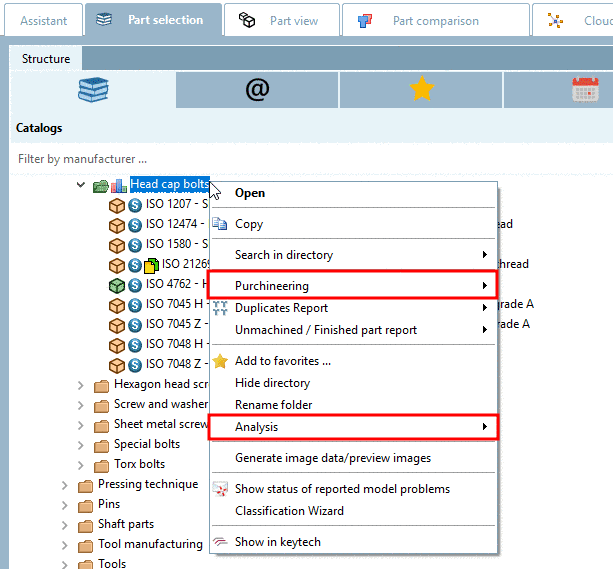
The following functions are found under the menu item Purchineering:
Comparison: Own part <-> Supplier part
At which parts is know-how available, which parts can be purchased?
The function Make or Buy enables you to search any other directories (supplier catalogs) for identic or similar parts, based on a selected directory (with any amount of own parts [111] e.g., possibly the parts of a complex assembly)
The Make or Buy report function supports you at making the best decision regarding whether to produce parts or better buy them.
More information is found under Section 3.1.13.1.4, “ Make or Buy report”.
Comparison: Supplier part <-> Supplier part
In the course of supplier consolidation or standardization the supplier parts comparison may be interesting.
The similarity comparison is primarily performed on a geometric base. An interesting feature is the additional textual search for reference statements to standard parts.
More information is found under Section 3.1.13.1.5, “"Find suppliers" report ”.
Comparison: Supplier part <-> Supplier part
If for the supplier comparison explicitly the cost side shall be taken into focus, select the Cost Mockup report.
The Cost mockup function delivers additional prices of search and compared parts in the report, so that you can make a costing on this base. Hereto a respective price column in the LinkDB is needed.
More information is found under Section 3.1.13.1.6, “"Cost mockup" report”.
Keyword Global Sourcing: Do not ship parts around the world! When you want to check who is the best supplier, then its branches are determining.
The "Find supplier branches" report delivers the supplier sites sorted in a matrix of defined countries and supplier catalogs.
More information is found under Section 3.1.13.1.7, “ Find Supplier branches ”.
Reduction of process costs by C-parts: An important precondition is the supplier consolidation. Replacing parts of different suppliers by parts of one supplier can also help reducing the costs.
Some suppliers make detailed additional information of their own catalog available, so that their parts become comparable to other catalogs.
More information is found under Section 3.1.13.1.8, “ Kanban Report ”.
![[Note]](images/note.png) | Note |
|---|---|
As an alternative for Purchineering strategies, in the context menu under Analysis, you can find the functions Make or Buy, Cost mockup, Find suppliers and Duplicate analysis. Details on Analysis functionality can be found under Section 3.1.14, “ Analysis ”. The functions under Purchineering and Analysis have both their respective advantages. Purchineering is more designed for report functionality, Analysis more for speed, as reports are only created when requested.
| |
[111] The report can be created based on SAT/STEP/IGES/STL files. Details on import via PLMsynchro can be found under PLMsynchro - Erstellen von Eigenteilekatalogen.