5.7.5.1.
Roles: General " tab page
5.7.5.1.7.
Export condition - plinkgroups.cfg -> Block [role name] -> Key "EXPORTRESTRICTION"
|  |
| Prev | Next |
5.7.5.1.
Roles: General " tab page
5.7.5.1.7.
Export condition - plinkgroups.cfg -> Block [role name] -> Key "EXPORTRESTRICTION"
| |
| Prev | Next |
Export restrictions contribute substantially to the controlled use of parts.
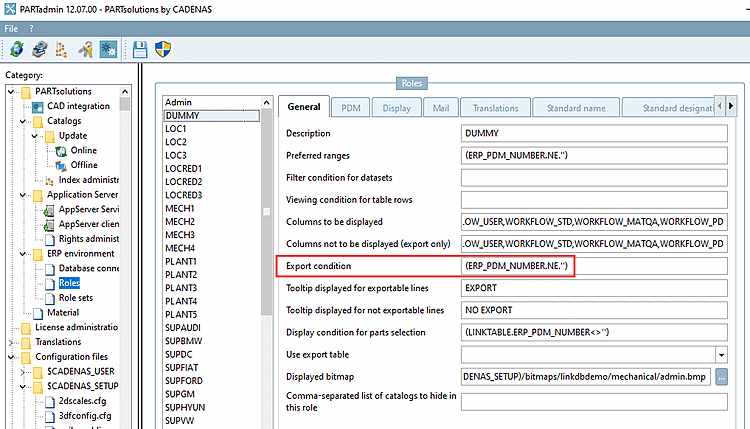
The setting is made in the user interface under PARTadmin -> Category Roles -> General tab -> Export condition or alternatively via configuration file plinkgroups.cfg -> Block [Role name] -> Key EXPORTRESTRICTION.
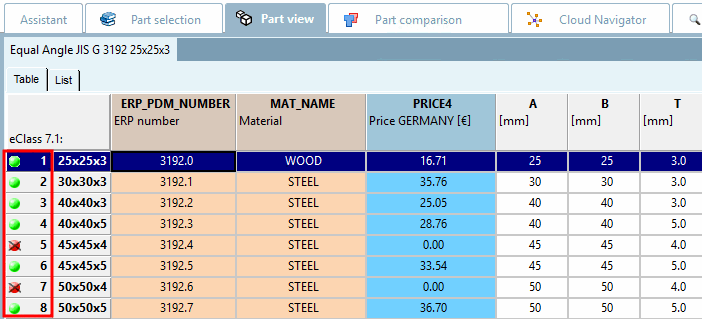
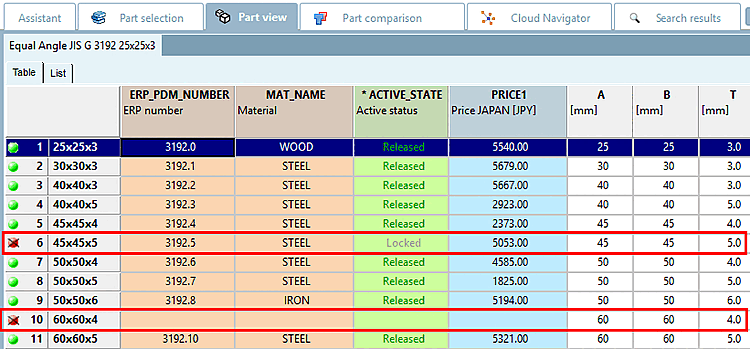
An existing export restriction is signalized by a status light in the table, at the beginning of each line.
Standard status display: The green/red display is standard:
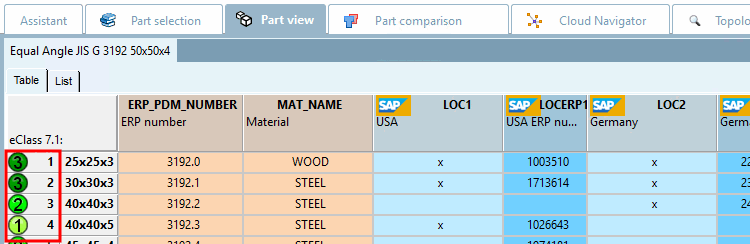
Extended status display: With the setting under PARTadmin -> Category Roles -> Display tab page -> Status bitmaps for table [Status indicating bitmaps for table view] dialog area, you can use any type of status display. See Status Section 5.7.5.3.1, “ Status icons for table - plinkgroups.cfg -> Block [<role name>] - key "BMPCONDITION<number>" ”" Section 5.7.5.3.1, “ Status icons for table - plinkgroups.cfg -> Block [<role name>] - key "BMPCONDITION<number>" ”.
Setting via user interface: PARTadmin -> Category Roles -> General tab -> Export condition
For this setting you can use Fortran syntax or SQL syntax as well.
EXPORTRESTRICTION = ERP_PDM_NUMBER.NE.''
or
EXPORTRESTRICTION = ERP_PDM_NUMBER<>''
Meaning: ERP_PDM_NUMBER may not be equal to "blank".
Only rows which meet the condition get the green status light.
A data record without ERP number is displayed in red and thus is not exportable.
EXPORTRESTRICTION = ((ERP_PDM_NUMBER.NE.'').AND.(ACTIVE_STATE.EQ.'1'))
Meaning: There has to be an ERP_PDM_NUMBER AND the entry in the "Active state" column must be "Released". Both conditions have to be fulfilled.
EXPORTRESTRICTION = ((ACTIVE_STATE.EQ.1).AND.(BLNNR.NE.''))
Meaning: Only data sets can be exported, which current status is "Released" and which have an entry in the "BLNR" column.
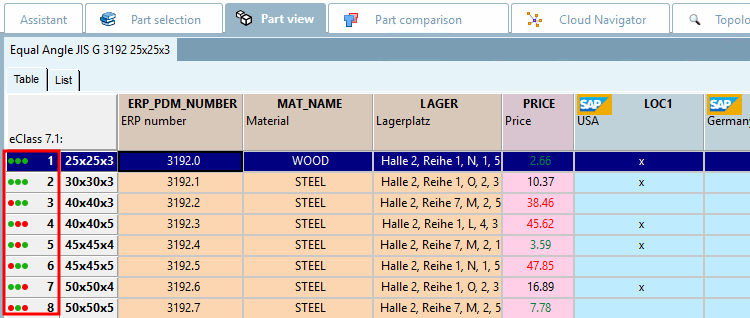
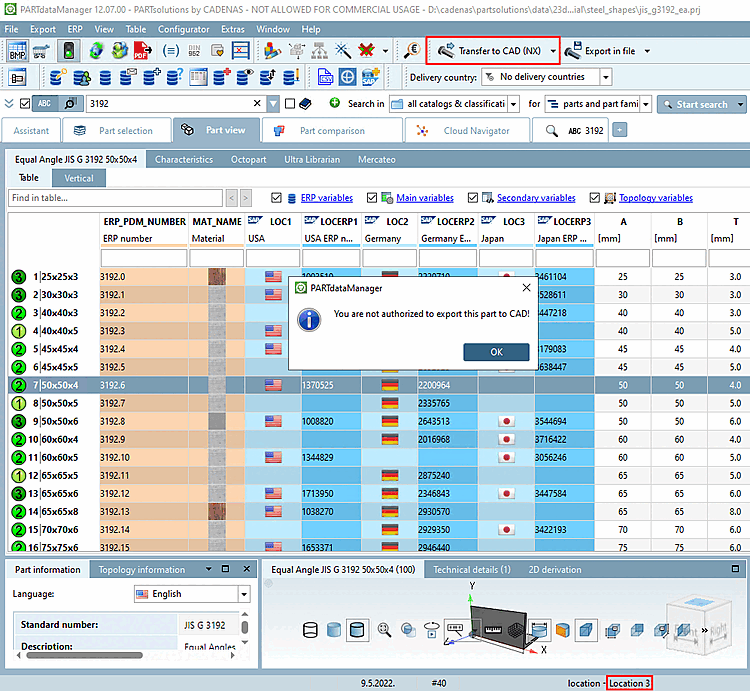
This example shows the setting options via config file or via PARTadmin in detail and shows enhanced status lights.
Setting in configuration file
$CADENAS_SETUP/plinkgroups.cfg:
Block [<role name>], key EXPORTRESTRICTION, value contains condition
EXPORTRESTRICTION = ((ERP_PDM_NUMBER.NE.'').AND.(LOC3.EQ.'x'))
Meaning: ERP_PDM_NUMBER may not be equal to "blank" AND the column LOC3 has to have the term 'x' as entry.
Example: The user with the role "Location 3" cannot export line 7 because column LOC3 does not show the entry 'x', which is required in the export condition [Export condition].
For this example, additional settings are required under PARTadmin -> Category Roles -> Display tab -> Status bitmaps for table [Status indicating bitmaps for table view]. This overwrites the standard red-green display, but the export condition remains unaffected. Details can be found under Section 5.7.5.3.1, “ Status icons for table - plinkgroups.cfg -> Block [<role name>] - key "BMPCONDITION<number>" ”.
![[Note]](images/note.png)