5.7.5.1.
Roles: General " tab page
5.7.5.1.6.
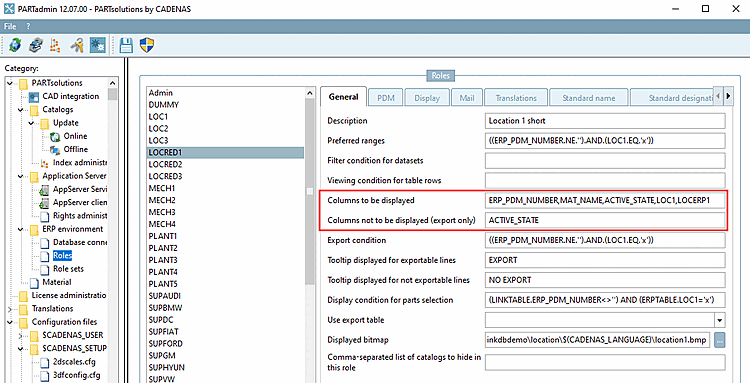
Columns to be displayed - plinkgroups.cfg -> Block [Role_name] -> Key "VARSUSED / VARSHIDDEN"
|  |
| Prev | Next |
5.7.5.1.
Roles: General " tab page
5.7.5.1.6.
Columns to be displayed - plinkgroups.cfg -> Block [Role_name] -> Key "VARSUSED / VARSHIDDEN"
| |
| Prev | Next |
![[Note]](images/note.png) | Note |
|---|---|
The setting is role-dependent. You can therefore configure the column display differently for each role if required. | |
Setting in the configuration file
$CADENAS_SETUP/plinkgroups.cfg:
Block [<variable name>], key VARSUSED
Enter all columns to be displayed as value in the form of a comma separated list.
| Note |
|---|---|
The here defined order of the columns is exactly according to the column order in PARTdataManager and thus role-oriented. | |
[Role_name]
VARSUSED=ERP_PDM_NUMBER,MAT_NAME,ACTIVE_STATE,REQUESTED_STATE
VARSHIDDEN=REQUESTED_STATE
Setting in PARTadmin -> Category Roles -> Tab General -> Columns to be displayed
Columns not to be displayed [Columns to hide] are also to be listed separated by commas.
| Note |
|---|---|
This setting has to be used, if values from columns shall be exported or column names are used in any conditions, but the columns shall not be displayed. | |
You have entered the following export condition [Export condition]:
EXPORTRESTRICTION=((ERP_PDM_NUMBER.NE.'').AND.(ACTIVE_STATE.EQ.1))
But you do not want to display the "ACTIVE_STATE" column.
[Role_name]
VARSUSED=ERP_PDM_NUMBER,MAT_NAME,ACTIVE_STATE
VARSHIDDEN=ACTIVE_STATE
I.e., only parts, which have an ERP_PDM_NUMBER and furthermore which "Active status" is set on "Released" are allowed to be exported.
"ACTIVE_STATE" must be entered both under Columns to be displayed and Columns not to be displayed [Columns to hide]. If the "ACTIVE_STATE" declaration were omitted, the export would not work.
Sorting sequence of column in PARTdataManager
Column sequence of the ERP columns
The column sequence of the ERP columns in PARTdataManager corresponds exactly to the position in the listing under PARTadmin -> category Roles -> General tab -> Columns to be displayed.
Sorting sequence of geometry columns in relation to ERP columns
By default, ERP columns are displayed before geometry columns.
In case that some ERP columns are to be displayed at the front and others behind geometry columns - in other words the geometric data somewhere in the middle, then please use the following syntax:
ERP_PDM_NUMBER,MAT_NAME, ... ,DESCRIPTION
At the position of "..." the geometry columns are displayed.
Column order of the geometry columns one below the other
You can even adjust the order of the geometry columns (project-related). See Section 5.27.8.2.7.3, “Column sorting of geometry columns in PARTdataManager ”.
Column visibility in PARTlinkManager
Information on column visibility in PARTlinkManager can be found under Section 5.27.4.3.2.1.4, “ Modify column display ”.