5.1. Introduction 5.1.3. Complete workflow
|  |
| Prev | Next |
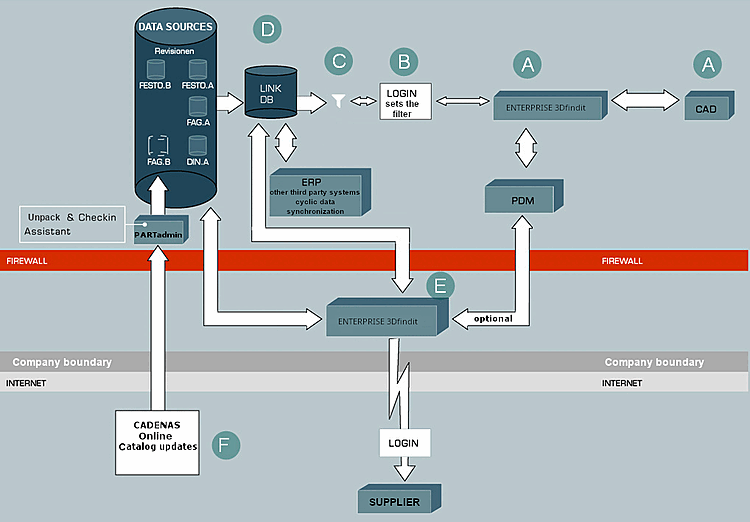
The following illustration shows the entire workflow between CAD, ENTERPRISE 3Dfindit, PDM/ERP, LinkDB, catalogs and external connections.
A During a design or purchasing process, the engineer or purchaser calls up the intelligent parts management system from CAD or from his workstation.
A detailed description of the ENTERPRISE 3Dfindit commands in CAD can be found under 3Dfindit call from CAD.
B : After identifying himself and his "role" through the system - this is generally enabled via Single Sign On (one-time operating system log-in) and central administration of the user data from a central LDAP database - he gets access on the central database for standard parts and supplier parts.
C Depending on the role and authorization of the user, the views of the parts inventory are different.
A description of this from the user's perspective can be found under Chapter 10, ERP functionality in ENTERPRISE 3Dfindit - User.
Detailed information on setting up the role rights system can be found under Section 5.7, “ Set up ERP environment ”.
D Geometric standard, repeat and purchased part data such as length, width and height are linked directly to any other company data via a relational referencing database (LinkDB) using online access or online replication. The entire data is displayed in the user interface of the ENTERPRISE 3Dfindit parts management system. After selecting the part, the corresponding geometry is generated or taken from the PDM system and placed in the CAD system.
For the initial linking of data from third-party systems with ENTERPRISE 3Dfindit, see Section 1.1, “ Article assignment (initial filling of the LinkDB) ” in PARTwarehouse.
E : Suppliers can access the same data master online via web technology. ENTERPRISE 3Dfindit also supports you in defining workflows, such as requesting or creating article master numbers. Manufacturer catalogs are updated several times a year. Information about product changes, innovations or the adjustment of the product portfolio must also be promptly available in your systems.
F : To update parts catalogs, an integrated update assistant is therefore available, which determines whether your current data match with the newest catalog state of the manufacturer and determines new revision states to download. Of course the changes in the manufacturer catalogs will be shown before the installation and available data will be automatically revised. Whether the manufacturer's parts have changed or are just out of stock, will be recognized through an up-to-date check and can be handed on to the connected ERP system.