2.7.3.5. Search and
analyze clustering results 2.7.3.5.3. Navigate the hierarchy graph |  |
| Prev | Next |
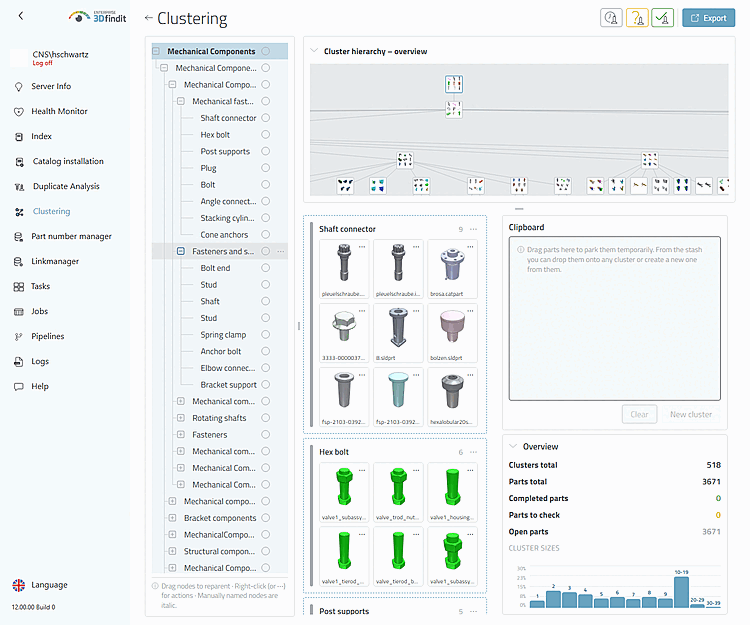
In the graphical overview of the hierarchy, you can view large clustering structures and focus on a specific branch of the tree without changing the clustering data.
"Cluster hierarchy - overview" expands the graph area above the cluster maps. The graph shows the same selected and filtered hierarchy as the tree.
The graph provides an overview of the structure, while the tree and maps remain available for a detailed view.
Use the mouse to move the view by dragging an empty area of the canvas; use the mouse wheel to zoom. Hover over a node to view its path and status details, and select it to center it on the screen. Using the keyboard, you can move the view with the arrow keys and zoom with the plus, equals, and minus keys; visible nodes are also available as accessible buttons.
At a reasonable zoom level, visible nodes load representative part previews. In the overview view, the previews are deliberately omitted so that large graphs remain responsive.
Hierarchy Graph – Area, Nodes, and Navigation Elements
The administrator navigates from a general overview of the hierarchy to the specific tree section and the loaded maps that need to be examined.