2.7.3.5.2. Filter and Analyze Test Status

Purpose

You can filter a clustering result by specific inspection statuses and analyze the status distribution without changing a part's status.

Requirements

Procedure

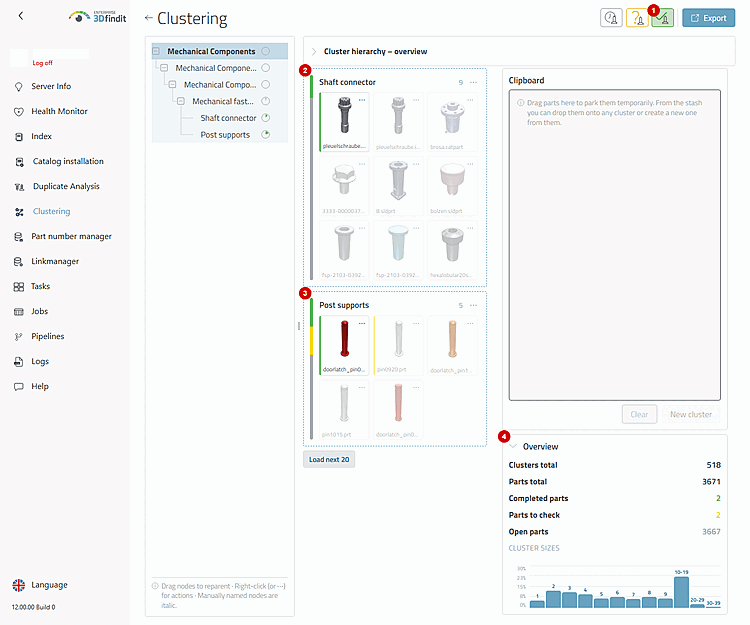
The status filter has separate switches for “Open,” “To check,” and “Done.” Multiple active switches are OR-linked: A cluster remains visible if it contains at least one part in any of the selected statuses. If all switches are off, the result is unfiltered.

The test status buttons filter the tree, graph, and maps and retain the selected results range.

The test status buttons filter the tree, graph, and maps and retain the selected results range.

Within a matching cluster map, parts with an unselected status remain visible but are dimmed. Cluster maps without matching parts are omitted. The tree and graph retain the necessary hierarchical context so that the filtered result remains navigable.

Options and Decisions in Operations

Test Status – Filter Switches and Evaluation Displays

Control element or State

Operating Instructions

"Open," "To check," "Done"

Separate switches for the statuses to be checked. Combine statuses if a check decision affects multiple work queues .

Status bar of the cluster map

Shows the actual distribution across "Open," "To check," and "Done" on the map, regardless of whether a filter hides individual items .

Progress Circle in the Tree

Shows the percentage of completed parts. The tooltip displays the total number and the number for each status.

"Overview"

List the number of clusters and parts in total and in the selected range, as well as the totals for the three inspection statuses.

"Cluster sizes"

Group clusters by ranges of the number of parts to highlight unusually small, large, or uneven groups.

Result

The administrator has a filtered, navigable view of open, pending, and completed audit work, while the underlying clustering remains unchanged.
Tips and Troubleshooting
