5.23. 3Dfindit
Customizing 5.23.8. Standard workflows for CAD & PLM/PDM environment |  |
| Prev | Next |
This section can only provide a brief overview. Due to the wide range of customization options, the most diverse customer wishes can be realized.
The following is a common use case when a CAD & PLM/PDM environment is available:
Standard users should not be allowed to create new parts, but only use the existing ones. If a new part or a new size is required, this must be requested and approved by the key user, standards body, etc.
This results in the following procedure:
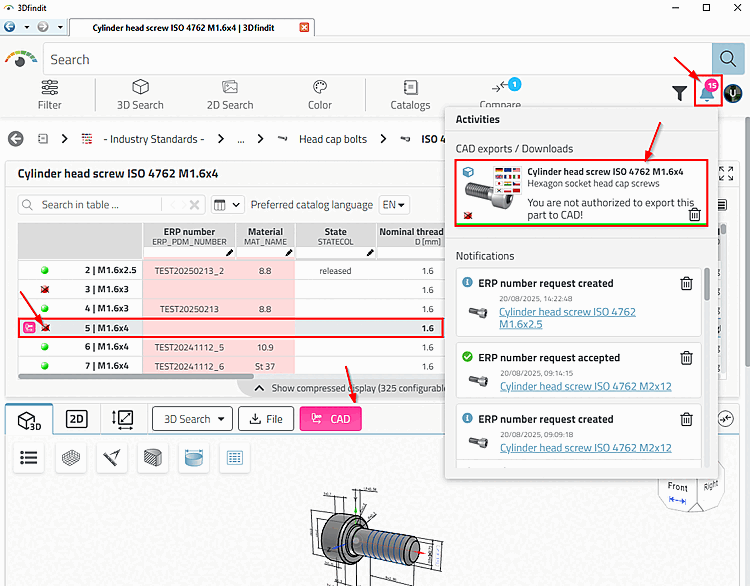
User finds a known part size (green status icon at the beginning of the line = available in PLM/PDM).
User requires a new, as yet unknown part size: When clicking on , the following message appears, for example: "You do not have authorization to export the part to CAD! [You are not authorized to export this part to CAD!]".
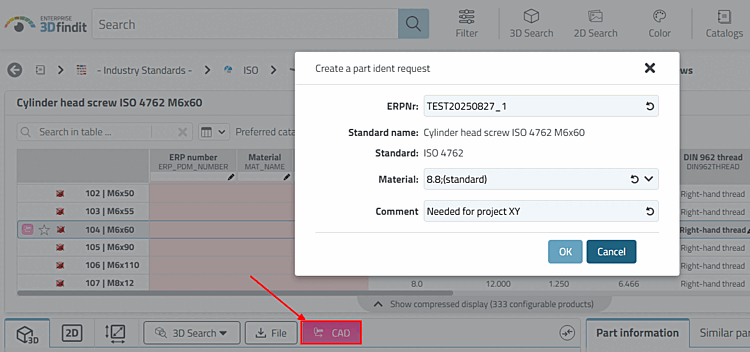
Application process via dashboard, about which the key user is informed. See Section 5.23.8.2, “Apply for ERP number via Part number manager ”.
Furthermore, the application process can be initiated via various functions:
via WEB_ACTION "CREATE_REQUEST_ACTION" or "ADD2DB_REQUEST_ACTION" -> See Section 5.23.8.2, “Apply for ERP number via Part number manager ”.
via WEB_ACTION "EXPORT_ACTION" -> See Section 5.23.8.2.4, “Trigger request via "CAD" button”.