Chapter 5. Strategic Parts Management
5.13.
Design "Request Ident Number" dialog box - erpcustom.cfg -> Block [REQUESTDIALOG] |  |
| Prev | Next |
Chapter 5. Strategic Parts Management
5.13.
Design "Request Ident Number" dialog box - erpcustom.cfg -> Block [REQUESTDIALOG] | |
| Prev | Next |
In 3Dfindit
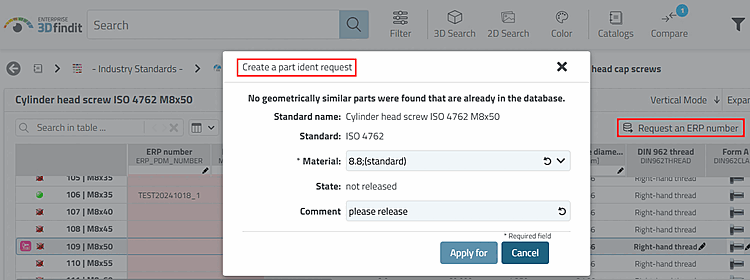
opens by clicking on the Request an ERP number button the Create a part ident dialog box
request.
the Create a part ident dialog box
request.
The
Settings only applies to 3Dfindit when using the
Request
to ERP number
with call via [WEB_ACTIONS] >
CREATE_REQUEST_ACTION.
So that the button
is displayed, [WEB_ACTIONS]
erpcustom.cfg the key with the value
CREATE_REQUEST_ACTION be active.
[WEB_ACTIONS]
6=CREATE_REQUEST_ACTION
The dialog can be the same for all users or user-specific.
[REQUESTDIALOG(User1)]
keys....
[REQUESTDIALOG(User2)]
keys...
etc.
As the name suggests, the dialog is only
active in requests. Processing actions on the part of the administration,
Standards office, key users run via block [USERDIALOG].
The syntax
corresponds exactly to the syntax in the [USERDIALOG] block. See Section 5.12, “
Design "New ident number " dialog box - erpcustom.cfg -> Block [USERDIALOG]
”.