5.24.2.3.
MSI Installation: Silent Install 5.24.2.3.3. Features |  |
| Prev | Next |
General: Under ADDLOCAL, list all desired features separated by commas.
ADDLOCAL=Feature1,Feature2 ...
Example: ENTERPRISE 3Dfindit and NX Integration are to be installed. The integration should also be activated immediately.
ADDLOCAL=F.apps_psol_enterprise,F.CAD_NX,F.AutoActivateInterfaces
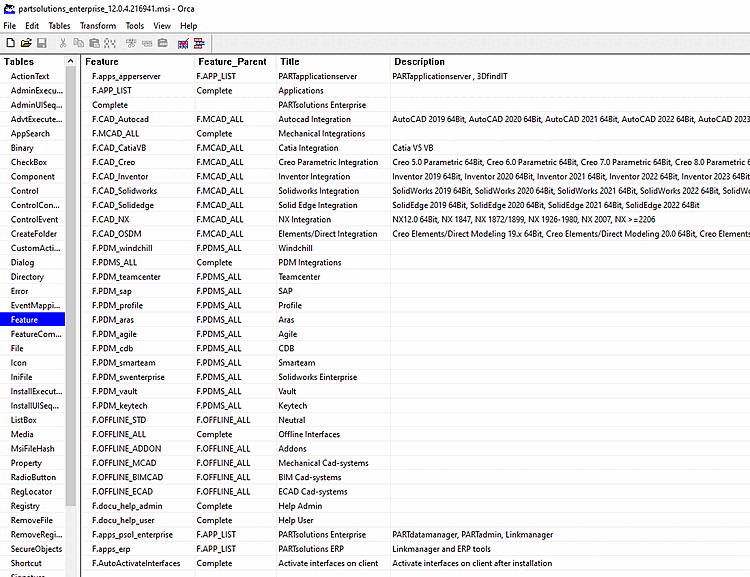
Following Orca table shows all features, which can be set under ADDLOCAL.
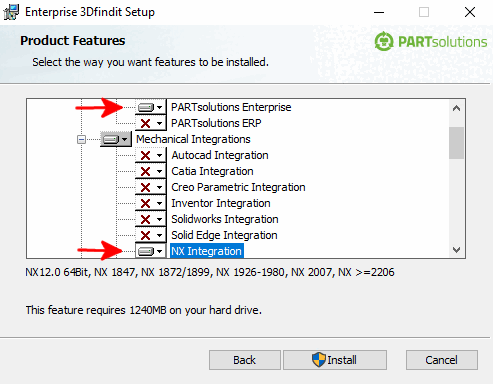
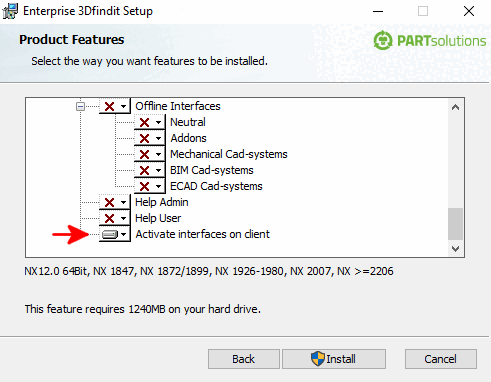
The following figures show the equivalents in the UI (ENTERPRISE 3Dfindit, activate NX integration and interfaces on the client ).
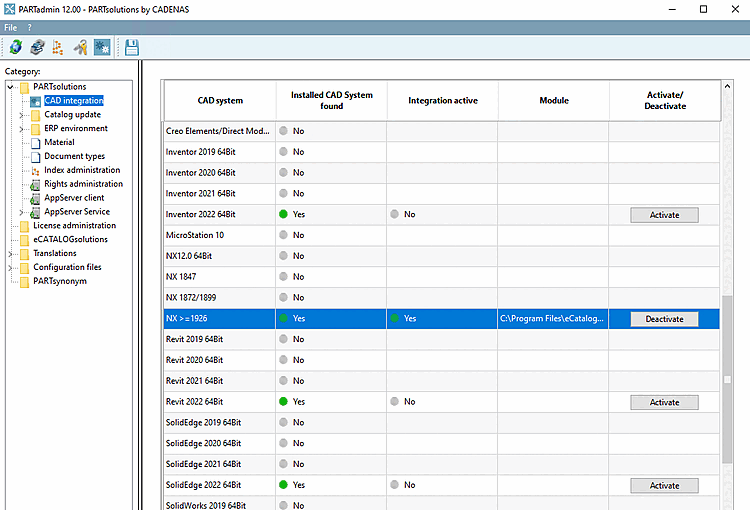
Activate interfaces on the client [Enable interfaces on the client] (F.AutoActivateInterfaces): If the CAD systems are already installed, you save yourself a manual activation if you activate the option. In PARTadmin under the CAD integration category, you can also carry out the activation manually later. See also Section 1.4.2, “ CAD integration ”.
Batch scripts are available at ...\software\install\scripts, which can be executed locally at any time to activate/deactivate all integrations. These can also be used administratively in the course of software distribution with deployment.