7.8.11.
Storage location: Only in geometry | Only in table | In geometry and table
7.8.11.2. Use mathematical function in sketch or feature algorithm? |  |
| Prev | Next |
7.8.11.
Storage location: Only in geometry | Only in table | In geometry and table
7.8.11.2. Use mathematical function in sketch or feature algorithm? | |
| Prev | Next |
It is often possible to create a sketch with or without using a feature algorithm [Attribute algorithm]. For example, you can perform a calculation directly in the sketch or assign it to a separate variable using a feature algorithm.
![[Note]](images/note.png) | Note |
|---|---|
| |
Mathematical function in sketch [90]
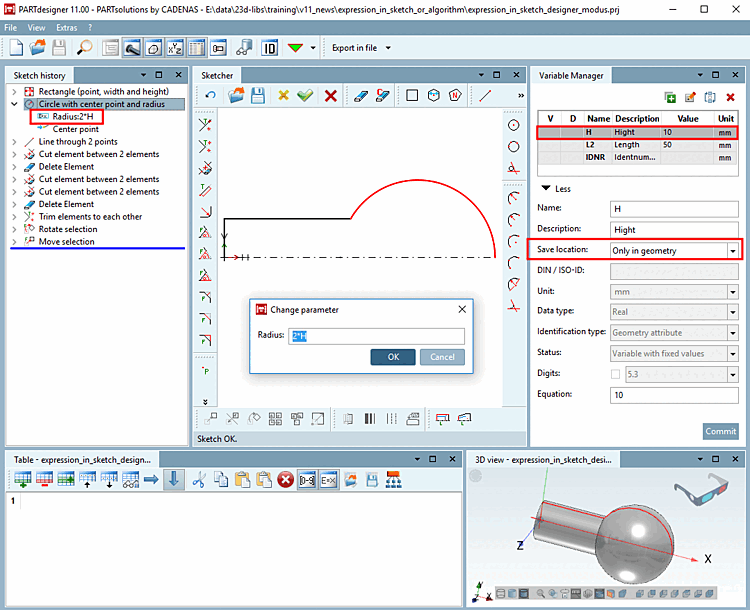
If you only use variables without a feature algorithm, it is possible to create the sketch with the "Only in geometry [Only in geometry] " storage location [Save location] in the first step. You can tell from the color code  that the variables H and L2 have been saved in the 3db file.
The circle radius should be twice the height of the rectangle. The calculation is performed directly in the sketch.
Radius: 2*H
If necessary, you can save [Save location] later with "In geometry and table [In geometry and table] ". You can also use value range variables [Value range variables] and characteristic algorithms [Attribute algorithms] and create the table with the " In geomet [In geometry and table] ry and table" storage location [Save location].
Variables saved with storage location [Save location] "In geometry and table [In geometry and table] "
Mathematical function in attribute algorithm [91]
The procedure is different if you use variables with a characteristic algorithm [Attribute algorithm]. The procedure using a characteristic algorithm will now be shown for the same component as above.
You start by creating the variables with the storage location [Save location] In table only [Only in table] or In geometry and table.
When creating the variables, select the option "Only in table [Only in table] " or "In geometry and table [In geometry and table] " under " Storage location [Save location] ". Fill in the fields and then click on ".
You can see from the color code where the variables L2, H and R are saved. To create the table, it is sufficient to save with the "Only in table [Only in table] " storage location [Save location]. (color code  ). The data is stored in the tab/tac file.
However, if variables are also to be used in the 3D model, they must be saved in both the 3db file and the tab/tac file. You can ensure that they are saved in the 3db AND tab/tac file by selecting a variable, selecting the "In geometry and table [In geometry and table] " storage location [Save location] and clicking .
You can tell by the color code  that the variables have been saved [Save location] with the storage location [Save location]
"In geometry and table [In geometry and table] ".
that the variables have been saved [Save location] with the storage location [Save location]
"In geometry and table [In geometry and table] ".
For the mathematical operation R = 2*H (circle radius is 2x rectangle height), the variable R is created with the status [Status] "Feature algorithm [Attribute algorithm] ".
The algorithm is entered under Formula [Equation] and the Characteristic algorithm [Attribute algorithm] option under Status.
The variable R can now be used in the sketch for the parameter input of the circle radius.
Optionally, the variable [Variable] R can be displayed with the stored feature algorithm [Attribute algorithm] in the PARTdataManager can be displayed.
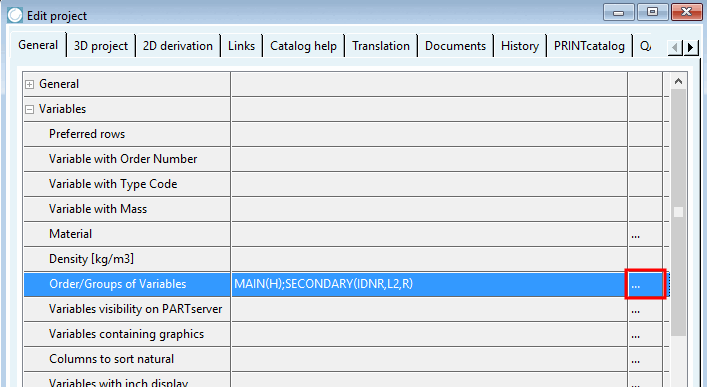
Click in PARTproject under Edit project -> General tab -> Variables section -> Order/groups of variables [Order/Groups of Variables] on the button
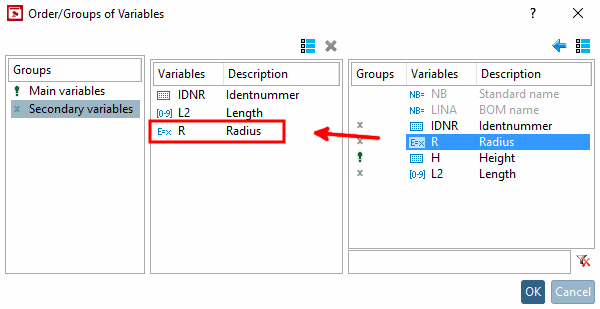
Select the group of secondary variables [Secondary variables] on the left and move the variable R to the middle field. You can find details on this at Section 5.9.2.3.3, “ Variable groups - columns (variables) visible / hidden ”.
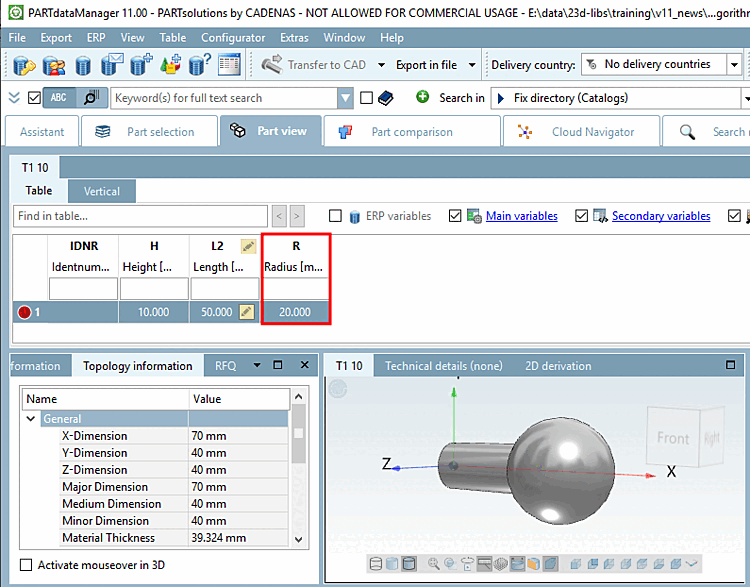
The variable R is displayed in the table.
| ||||
[90] You can find a suitable example of this in the training catalog in the directory \v11_news\expression_in_sketch_or_algorithm\expression_in_sketch.prj.
[91] You can find a suitable example of this in the training catalog in the directory \v11_news\expression_in_sketch_or_algorithm\expression_in_algorithm.prj.
![Variables saved with storage location [Save location] "In geometry and table [In geometry and table] "](resources/img/img_bc7a0387297f490490f1a2da99678f6b.png)
![When creating the variables, select the option "Only in table [Only in table] " or "In geometry and table [In geometry and table] " under " Storage location [Save location] ". Fill in the fields and then click on "Apply [Commit] ".](resources/img/img_1781421714564b92b87294c6b2c42e8d.png)
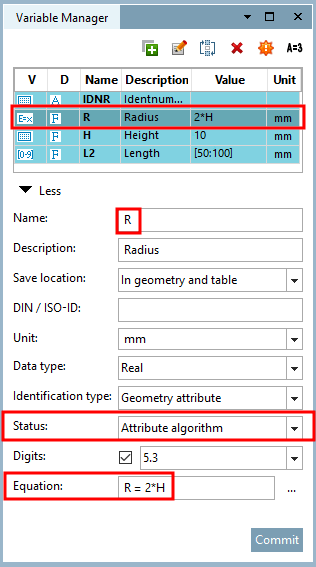
![Variable "R" with feature algorithm [Attribute algorithm]](resources/img/img_768bfee9f27946cea8aa6a43f92e8a8c.png)