7.9.
Docking window "Sketcher "
7.9.1. Overview of
user interface |  |
| Prev | Next |
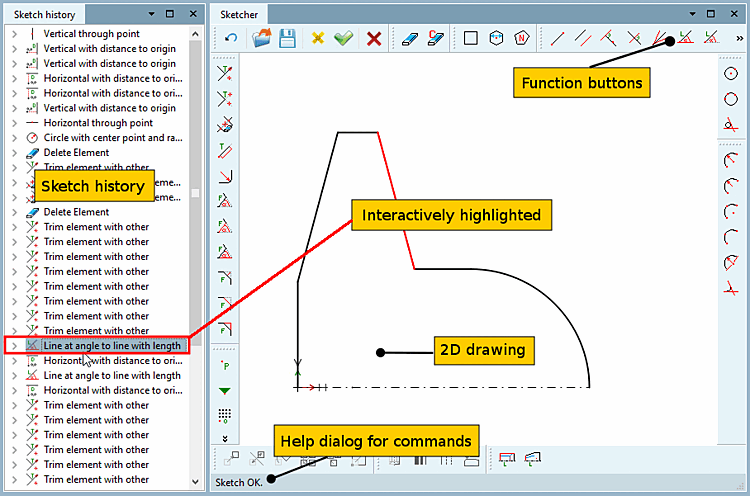
The interface of the feature based Sketcher is divided into the following areas:
The tools provide the individual drawing functions for the sketcher. On this, see Section 7.9.3, “Tools ”.
Click on a button to select the tool. Then click in the drawing and carry out the design step.
The design step is recorded in the sketch history [Sketch history] on the left.
Sketch history (with construction steps/features on the left)
The sketch history [Sketch history] is a list of all design steps. You can return to each step and make changes.
Sketcher (graphics area on the right)
In the graphic area, the complete sketch with (possibly a lot of) design steps is designed.
| ||||
In the status bar at the bottom left, a help dialog for commands is shown.
![[Note]](images/note.png)