3.4.7.2. Additional information 3.4.7.2.8. Physical properties from 3Dfindit
|  |
| Prev | Next |
If the physical properties are set in the CNS classification on the 3Dfindit side, these are also transferred to the CAD system during export.
In 3Dfindit, the attributes of the CNS classification are displayed in the part information [Part information] docking window.
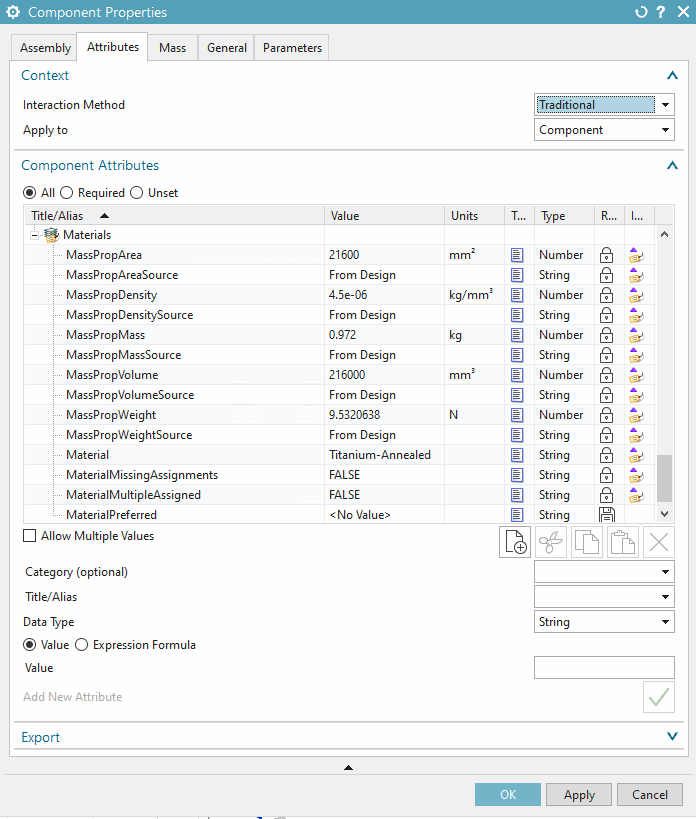
In NX, the material properties are available at part level under Properties -> Attributes tab,
The available methods for the display of mass properties depend on respective NX version.
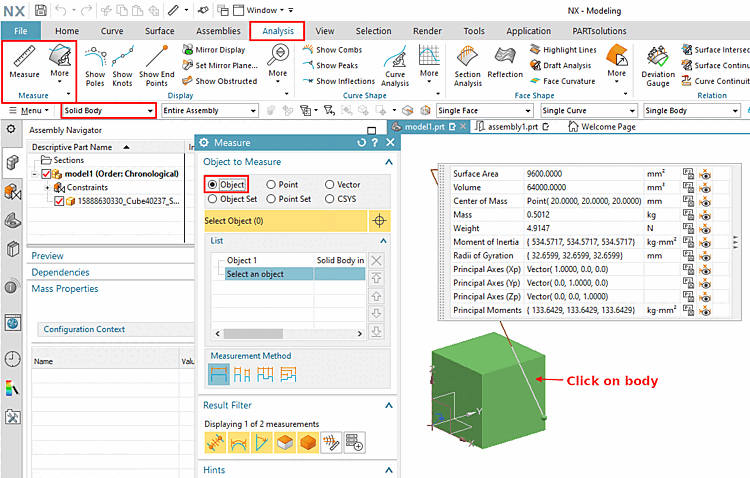
Example from NX 1899: Analysis > Measure > Selection Filter "Solid Body" > Measure dialog (Object) > click on body
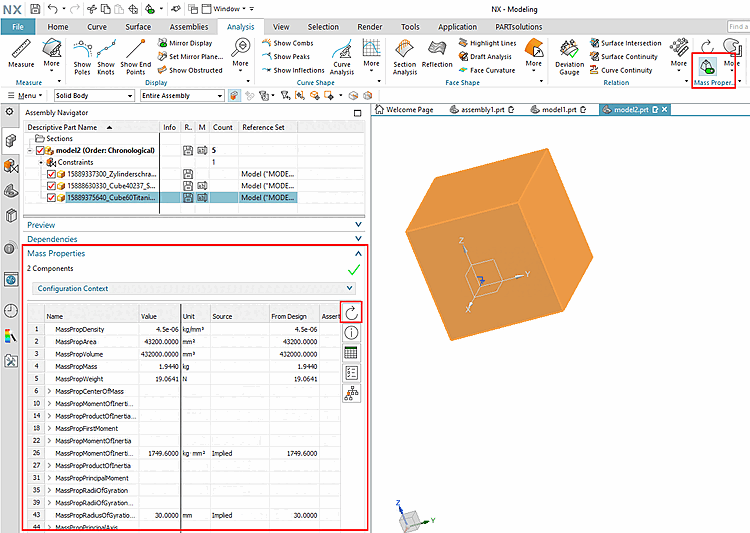
Example from NX 1899 : Analysis->Show Mass Properties->Expand Mass Properties on the Assembly Navigator tab -> Update
The following points show how NX behaves in different scenarios:
As the volume property cannot be changed in NX, the volume transferred from 3Dfindit (CNSVOLUMEEXACT) is ignored. Instead, the actual volume of the model is always used for all calculations.
Where does the density value come from? (Priority ordered from top to bottom)
Where does the value for the mass come from? (Priority sorted top down)
If the mass (CNSMASSEXACT) is transferred from PARTsolutions, then it is overtaken with highest priority.
The density of the model is calculated from the mass. CNSDENSITY and the density information from CNSMAT are ignored.
If the material (CNSMAT) is supplied, it is mapped, provided there is an entry in the pyhs_material.dat file of the NX installation.
If neither CNSMASSEXACT nor CNSMAT are transferred from 3Dfindit, the density is taken from CNSDENSITY and the mass is then calculated from this value.
If no parameters are transferred from 3Dfindit, the density is assigned a default value of 7830.64 kg/m³ by NX.
Setting options for physical properties
The following setting options are available in the configuration file ifugnx.cfg for handling the physical properties of solids during export:
[Categories]
PhysicalPropertiesMode=0/1/2/3
0: Physical properties are not mapped at all. They are either acquired from the material (if provided) or calculated from NX customer defaults.
1: "Assert" mode for the physical properties
Physical properties are "asserted" (mapped to specially provided NX fields). This option will make them appear in various information windows, such as the "Displayed Part Weight" properties dialog. It is also possible to map these properties to assemblies in this manner. Mass, density, volume and center of gravity can be mapped.
| ||||
2: "Real" physical properties are set
Physical properties are set at the model level (mapped directly to the actual NX physprops). This method only works with parts. Only density and mass can be assigned this way.
If PhysicalPropertiesMode=1 or 3, the following error message is issued if the key parameters are missing:
Die Zuweisung pyhsikalischer Eigenschaften ist aufgrund fehlender Schlüsselparameterfehlgeschlagen. Entweder die Masse oder sowohl Volumen als auch Dichte müssen für eine erfolgreiche
"PhysicalPropertiesMode" auf 2).
![Parts information [Part information]](resources/img/img_2c0b0fb4188a43ab9f3e850dfe8577e6.png)
![[Note]](images/note.png)