Kapitel 5. Strategisches Teilemanagement
5.10. Tabellendarstellung in 3Dfindit/PARTdataManager und
(PARTlinkManager)
|  |
| Zurück | Weiter |
Kapitel 5. Strategisches Teilemanagement
5.10. Tabellendarstellung in 3Dfindit/PARTdataManager und
(PARTlinkManager)
| |
| Zurück | Weiter |
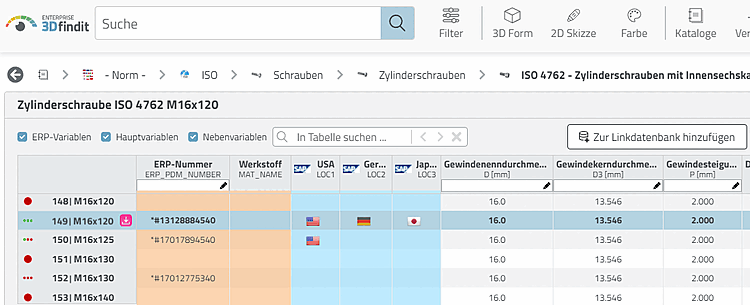
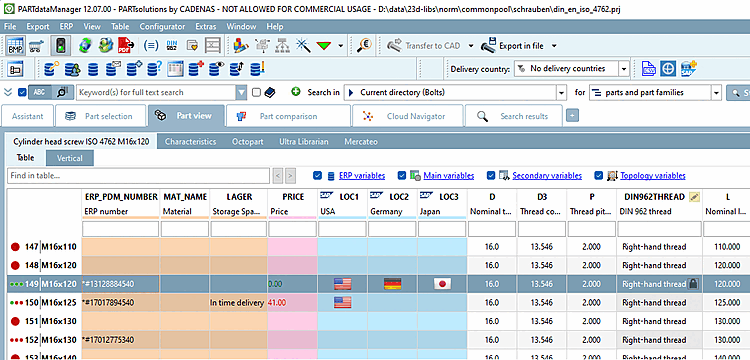
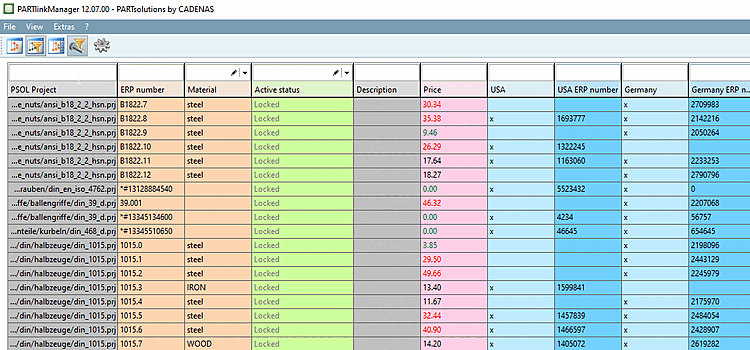
In diesem Abschnitt finden Sie Erläuterungen zur Tabellendarstellung in 3Dfindit / PARTdataManager und PARTlinkManager.[76]
![[Hinweis]](images/note.png) | Hinweis |
|---|---|
Alle Einstellungen, die in diesem Abschnitt erläutert werden, sind rollenabhängig und betreffen alle Rollen. | |
Folgende Aufstellung gibt einen Überblick:
Um die Auswahl einzelner Ausprägungen in der Tabelle (3Dfindit/PARTdataManager oder PARTlinkManager) zu vereinfachen ist es sinnvoll Farben, Bilder und Bedingungen zu verwenden.
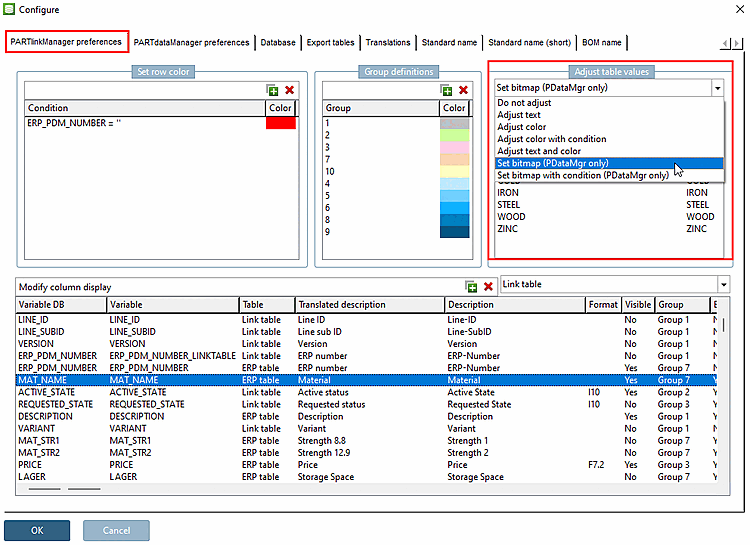
Einstellungen hierfür werden unter PARTlinkManager -> Extras Menü -> ERP-Umgebung konfigurieren [Configure ERP environment] -> Registerseite PARTlinkManager Einstellungen [PARTlinkManager preferences] -> Bereich Tabellenwerte anpassen [Adjust table values] gesetzt.
Die entsprechenden Schlüssel sind nicht Teil einer Default-Konfiguration. Falls die Einstellungsoption unter Tabellenwerte anpassen [Adjust table values] verwendet wird, werden durch diese Aktion in der Konfigurationsdatei Extra-Blöcke und Schlüssel angelegt.
In der PLDBDEMO-Datenbank finden Sie ein Beispiel hierzu im Block "MAPPING_ACTIVE_STATE".
In der PLDBDEMO-Datenbank finden Sie ein Beispiel hierzu im Block "MAPPING_ACTIVE_STATE".
Text und Farbe anpassen [Adjust text and color]
In der PLDBDEMO-Datenbank finden Sie ein Beispiel hierzu im Block "MAPPING_ACTIVE_STATE".
Farbe mit Bedingung anpassen [Adjust color with condition]
In der PLDBDEMO-Datenbank finden Sie ein Beispiel hierzu im Block "COLMAPPING_PRICE".
Bitmap setzen (nur PDataMgr) [Set bitmap (PDataMgr only)]
In der PLDBDEMO-Datenbank finden Sie Beispiele hierzu im Block "BMPMAPPING_LOC1" oder "BMPMAPPING_MAT_NAME".
Bitmap mit Bedingung setzen (nur PDataMgr) [Set bitmap with condition (PDataMgr only)]
In der PLDBDEMO-Datenbank finden Sie ein Beispiel hierzu im Block "BMPMAPPING_PRICE1".
Hintergrundfarben von Spalten (PARTdataManager und PARTlinkManager)
Um unterschiedliche Arten von ERP/PDM-Spalten voneinander abzugrenzen ist es sinnvoll verschiedene Hintergrundfarben zu verwenden. Siehe oben.
[76] Eine detaillierte Beschreibung des Moduls 3Dfindit aus Sicht des Anwenders finden Sie unter ENTERPRISE 3Dfindit - Anwender in ENTERPRISE 3Dfindit - Anwender.
Eine detaillierte Beschreibung des Moduls PARTdataManager aus Sicht des Anwenders finden Sie unter Abschnitt 2.1, „ PARTdataManager “ in PARTsolutions - Anwender.