2.1.6.4.6.
Geometric search (3D)
2.1.6.4.6.2. PARTdataManager: Further actions in the " Geometric search (3D) " dialog box |  |
| Prev | Next |
2.1.6.4.6.
Geometric search (3D)
2.1.6.4.6.2. PARTdataManager: Further actions in the " Geometric search (3D) " dialog box | |
| Prev | Next |
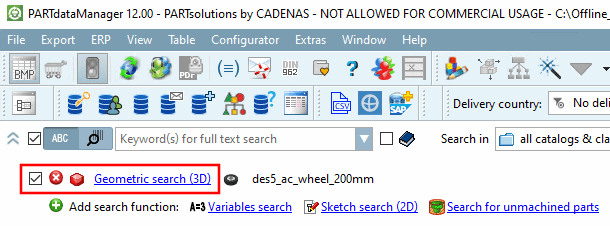
Click in PARTdataManager on the link next to the icon  Geometric search (3D).
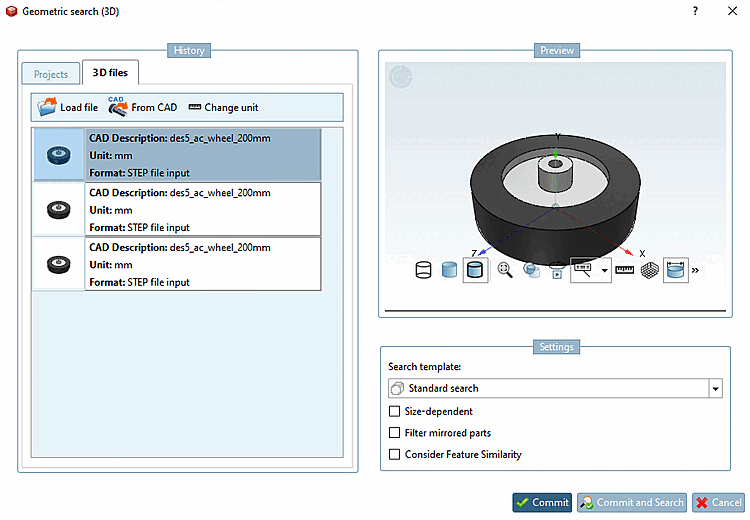
-> The same-named dialog box opens.
On the right under Preview, you will see the search part adopted for the geometric search.
On the left under History, on the 3D files tab page, you can perform the following actions:
Select any part in the history list. -> This part is used as the search part for the geometric search.
Click on the button to open an explorer window. Select any file in neutral format.
The Select unit [Selection of unit] dialog box then opens automatically. Specify the unit of the reference part and confirm with .
-> The selected component is added to the list under History, is already selected and therefore serves as a search part.
By clicking on the button, the current document (assembly or individual part) is added to the list under History, is already selected and therefore serves as a search part.
The component unit selected in the document is automatically adopted.[55] You can use Change unit to explicitly specify the unit if required.
Click on the button to open the Unit selection [Selection of unit] dialog box. Specify the unit of the reference part and confirm with .
Finish the action with click on one of the following buttons: