2.1.6.
Search and Part Selection
2.1.6.10.
Part comparison
|  |
| Prev | Next |
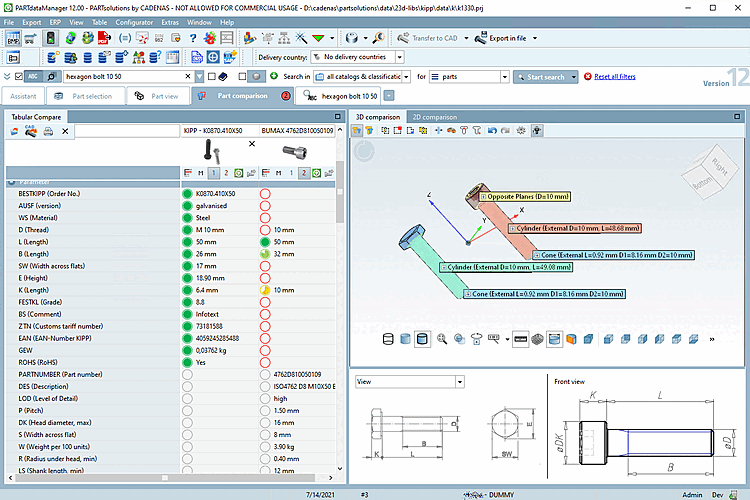
In the component comparison [Part comparison], you can compare part parameters in tabular form, inspect parts in detail in 3D and open the technical views at the same time. A 2D comparison is also available.
You will find the part comparison [Part comparison] on a separate tab. The number of open parts is displayed on the tab. If required, you can detach and move the docking window.
You can load parts from the index, the table or from search results, see below for details.
The docking window (tab page) Component comparison [Part comparison] shows the tab page Tabular comparison [Tabular Compare] on the left and the tab pages 3D comparison and 2D comparison on the right.
All projects that have been loaded into the component comparison appear in the Tabular comparison [Tabular Compare] section. (The component comparison supports up to 10 open projects)
Two projects can be loaded into the 3D comparison/2D [3D comparison] comparison [2D comparison] using the context menu command Load as 1st project [Load as first project] or Load as 2nd project [Load as second project]. You will find the commands in the tabular comparison itself, in the index, in the table and in search results.
Which project
is currently loaded can be seen by the activated icon  /
/  in the tabular compare. You can change the loaded
parts by clicking on the icons.
in the tabular compare. You can change the loaded
parts by clicking on the icons.
In the tabular comparison, you can click on the Select project line icon icon to open the table and adjust the characteristic.