2.1.6.7.
Search results
2.1.6.7.5.
Save search results: in favorites / in file |  |
| Prev | Next |
You have found parts which you often use?
Then select all or individual search results (selection via CTRL key) and save them as your favorites.
Perhaps you want to pass the results along and/or process in an external program?
Then save the search results (with the desired information from the table) in a text file.
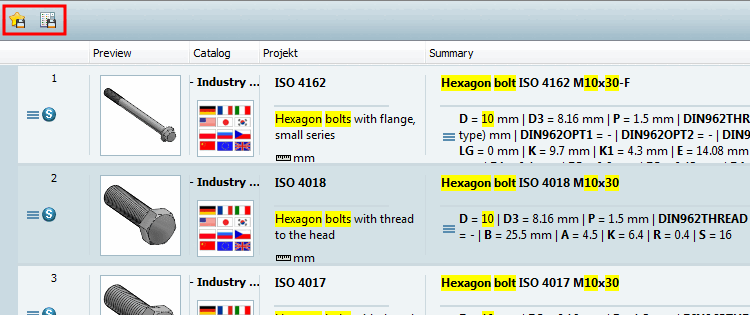
You will find the function calls in the form of two icons at the top left above the search results.
 Save search results in your favorites [Save search results in favorites]:
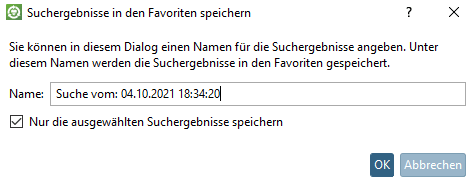
-> The same named dialog box opens. A name (date per default) is already entered. You can change this entry.
If you only want to save specific search results from the list, select them with the CTRL key and activate the option Save only the selected search results [Only save the selected search results].
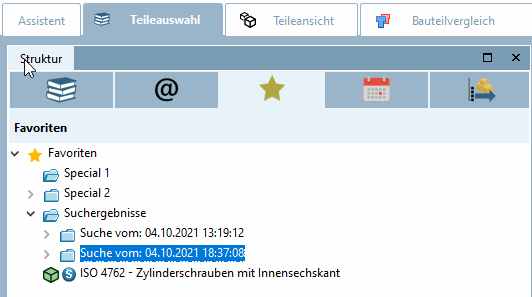
You will now find the entry on the Parts selection [Part selection] -> Favorites tab page.
From there you can open the desired parts anytime again. Also compare Section 2.1.6.4.12.5, “ Favorites " selection ”.
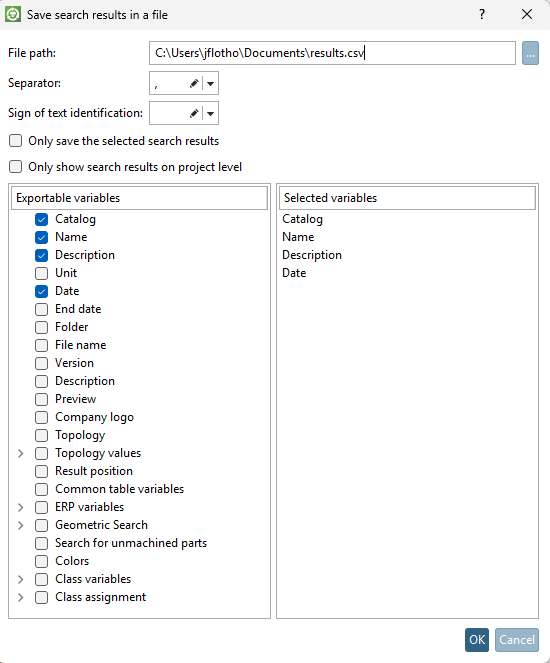
 Save search results in a file:
-> The same named dialog box opens.
If you only want to save specific search results from the list, select them with the CTRL key and activate the option Save only the selected search results [Only save the selected search results].
Click on the Browse button to specify the file path [File path].
At the desired columns activate the checkbox. This information will be overtaken from the search results table.
Only the selected variables are displayed on the right-hand side of the dialog window. Here you can determine the column sequence [Column order] by moving the individual variables up and down to the desired position while holding down the mouse button.
![[Note]](images/note.png)