5.7.5. Create and configure roles
5.7.5.4.
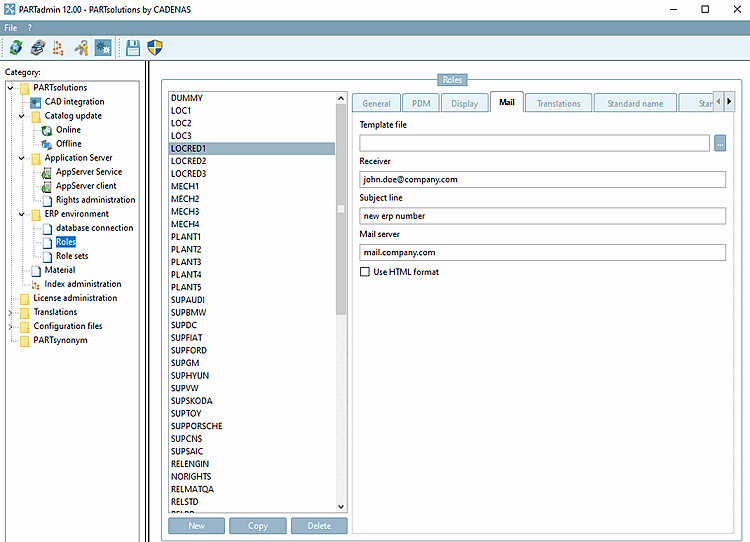
Roles: Tabbed page "E-Mail"
|  |
| Prev | Next |
PARTadmin -> Category -> PARTsolutions -> ERP environment -> Roles
In order to prevent uncontrolled part creation it makes sense to restrict the export into the CAD system. In this case the designer should have the possibility to request the desired part via e-mail.
The respective button is found in the ERP toolbar.
Click on the button  Apply for an ERP number by e-mail [Request ERP number per e-mail], the New ident number [new ident-no.] dialog box opens.
The basic setting can be made either in PARTlinkManager (role-independent) or in PARTadmin (role-dependent).
![[Note]](images/note.png) | Note |
|---|---|
The most important setting is the declaration of the e-mail server. It is easiest to make this setting in the PARTlinkManager, otherwise the setting must be made separately for each role. | |
PARTlinkManager -> Extras -> Configure ERP environment -> Tab PARTdataManager Settings [PARTdataManager preferences] -> E-mail notification [e-mail notification]
Basic setting role-independently
The entries are read from the configuration file $CADENAS_SETUP/plinkcommon.cfg
file.
[MAIL]
TEMPLATE=$CADENAS_SETUP/linkdbtemplate_$(CADENAS_LANGUAGE).html
SENDTO=j.doe@cadenas.de
SUBJECT=Neue ERP-Nummer
SERVER=mailserver.company.internal
PARTadmin -> Category Roles -> Role [Roles] selection -> E-mail [Mail] tab page
Basic setting role-dependently
The entries are read from the configuration file plinkgroups.cfg.
[Rollenname]
TEMPLATE=$CADENAS_SETUP/linkdbtemplate_$(CADENAS_LANGUAGE).html
SENDTO=name@cadenas.de
SUBJECT=My special subject
SERVER=mailserver.company.internal
The
Designing the dialog box is configured under $CADENAS_SETUP/erpcustom.cfg -> block
[USERDIALOG(role name)]. For details, see Section 5.12, “
Design "New ident number " dialog box - erpcustom.cfg -> Block [USERDIALOG]
”.
[USERDIALOG(ECAT4)]
NB=NB,Normbezeichnung:,0,0,,0,1,,,,,
NTLANG=NTLANG,NTLANG:,0,0,,0,1,,,,,
NN=NN,Norm:,0,0,,0,1,,,,,
LINALANG=LINALANG,LINALANG:,0,0,,0,1,,,,,
Werkstoff=MAT_NAME,Werkstoff:,1,1,,1,1,material_assign.cfg,full,,.*
PriceDE=PRICE4,Price Germany:,1,1,[cint(20*rnd+10)],1,1,,,,[0-9]*,0,1,1,,,,[0-9]*
This configuration is used both for the dialog call Add data record to link database [Add dataset to link database]
 as well as for the dialog call Request ERP number by e-mail [Request ERP number per e-mail]
dialog call.
as well as for the dialog call Request ERP number by e-mail [Request ERP number per e-mail]
dialog call.
Add data record to the link database [Add dataset to link database]: A field for the ERP number is added to the basic dialog.
Requesting an ERP number by e-mail [Request ERP number per e-mail]: The corresponding fields from plinkcommon.cfg or plinkgroups.cfg are added to the basic dialog.

![PARTlinkManager: E-mail notification [e-mail notification]](resources/img/img_05f7337e0b83492ab35bda972ed52707.png)
![Add data record to the link database [Add dataset to link database]: A field for the ERP number is added to the basic dialog.](resources/img/img_22a8cbdf3ba64444a0083ed832e1d537.png)
![Requesting an ERP number by e-mail [Request ERP number per e-mail]: The corresponding fields from plinkcommon.cfg or plinkgroups.cfg are added to the basic dialog.](resources/img/img_e4b29d877fbe4f3e9a3f271c22da73f4.png)