3.3.6.3.1. Block
[AttributeMapping(is3d)] - Set attribute language
3.3.6.3.1.1. Declare prefix for ENTERPRISE 3Dfindit attributes
|  |
| Prev | Next |
3.3.6.3.1. Block
[AttributeMapping(is3d)] - Set attribute language
3.3.6.3.1.1. Declare prefix for ENTERPRISE 3Dfindit attributes
| |
| Prev | Next |
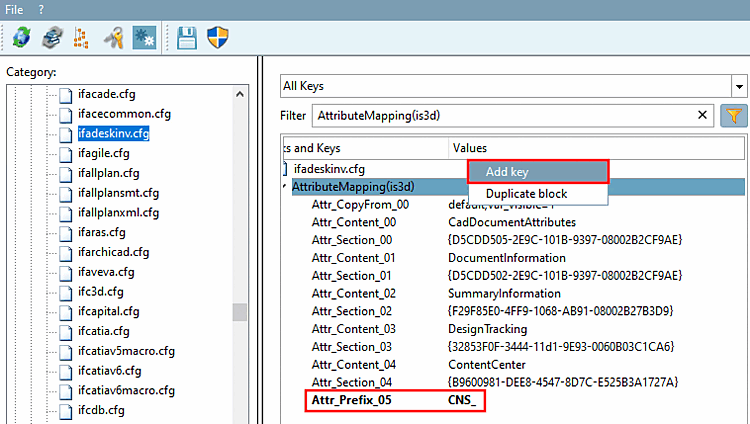
In the following example, a key is to be added in order to be able to provide the ENTERPRISE 3Dfindit attributes with a prefix.
![[Note]](images/note.png) | Note |
|---|---|
Both the standard attributes, as well as the extra attributes (see Section 3.3.6.3.2, “Block [CadDocumentAttributes] - Transfer user defined attributes ”) are given this prefix. | |
Open the AttributeMapping(is3d) block under PARTadmin > Configuration files category [Category] > $CADENAS_SETUP > ifadeskinv.cfg.
Insert a key (see also Section 1.7.1.4.3, “Editing blocks, keys and key values”).
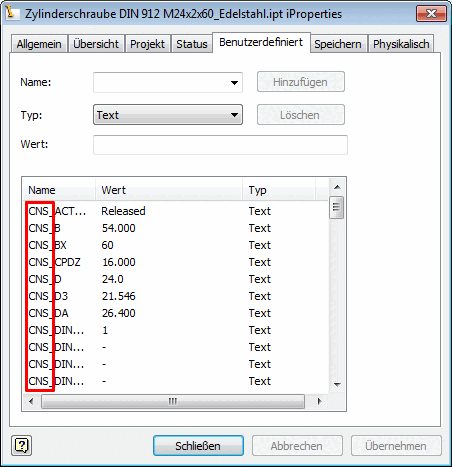
→ All ENTERPRISE 3Dfindit attributes now receive the prefix (here in the example "CNS_").