5.7.5.1.
Roles: General " tab page
5.7.5.1.10.
Catalogs to be suppressed / Show only these catalogs - plinkgroups.cfg -> Block [role name] -> Key "HIDELIST" / "EXCLUSIVELIST"
|  |
| Prev | Next |
5.7.5.1.
Roles: General " tab page
5.7.5.1.10.
Catalogs to be suppressed / Show only these catalogs - plinkgroups.cfg -> Block [role name] -> Key "HIDELIST" / "EXCLUSIVELIST"
| |
| Prev | Next |
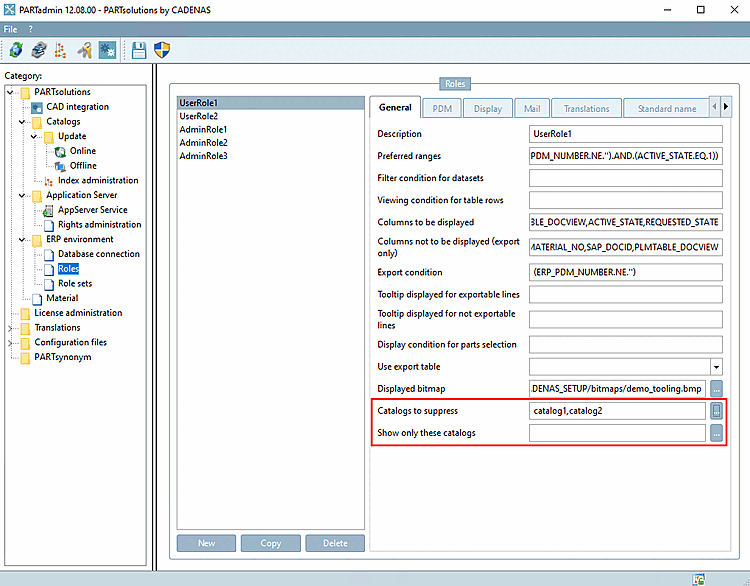
In PARTadmin it can be defined role-based which catalogs should be displayed.
There are two ways to do this:
Catalogs to be suppressed [Catalogs to suppress]: Hide certain catalogs or directories for a specific role.
Only display these catalogs [Show only these catalogs]: Exclusively display certain catalogs or directories for a specific role. With this method, you are on the safe side after a new catalog installation that the catalog is not automatically displayed initially, but you must actively intervene to make it visible.
Setting in user interface under PARTadmin -> Category Roles -> Tab General -> Catalogs to be suppressed [Catalogs to suppress] / Show only these catalogs
Enter the catalogs/directories to be hidden or exclusively shown in the key, separated by commas.
Setting in configuration file: $CADENAS_SETUP/plinkgroups.cfg-> Block [role name] -> Key "HIDELIST" or key "EXCLUSIVELIST"
![[Note]](images/note.png)