7.13. Docking window "Configurator " / "Assembly " 7.13.2. Project types
|  |
| Prev | Next |
When we talk about assemblies, we are generally referring to the assembly table project
 is generally meant, as it is by far the most important assembly project type. Today, this project type is used in almost all CADENAS catalogs for standard assemblies. The handling of this project type corresponds to that of individual parts. Functions of individual parts of the assembly are controlled via a common table.
Nevertheless, this chapter also refers to the assembly project types assembly configuration [Assembly configuration]
 and assembly template [Assembly template] (template)
  because the assembly table project
is set up using the other two.
because the assembly table project
is set up using the other two.
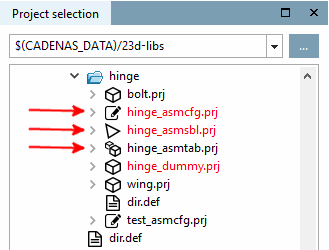
In all modules the different types are shown with distinctive icons in the index tree and possibly with a respective token in name.[108]
Assembly configuration [Assembly configuration] (_asmcfg.prj)
This is the basis for templates and assembly table projects.
Configurations do not set themselves up automatically, but are set up [Assembly] manually in the docking window.
Still in a very small minority of cases a catalog may consist of assembly configurations.
For more details see Section 7.13.2.1, “Configuration and Template ”.
Assembly template / template (_asmsbl.prj)
The template stores a very specific version of a configuration that is automatically created. The start element and the attached assembly components appear immediately in the Structure [Assembly] docking window.
Any number of templates can be saved on the basis of a configuration, but this is irrelevant for the creation of the assembly table project, as ONE unique, fully structured configuration is saved here as a template.
Still in a very small minority of cases a catalog may consist of assembly templates.
For more details see Section 7.13.2.1, “Configuration and Template ”.
The following table shows what is typical for each assembly type.
![[Note]](images/note.png)