7.11. Docking window "2D
derivation " - Create your own combination views (*.dw)
7.11.8. [ELEMENT_text]
Text
|  |
| Prev | Next |
7.11. Docking window "2D
derivation " - Create your own combination views (*.dw)
7.11.8. [ELEMENT_text]
Text
| |
| Prev | Next |
With "Text" you can place a text into the drawing. This also possibly makes sense in combination with a table, but also for the title of "Normal projection" or for ratio information, etc.
The "Text" element is declared in the dw file with "ELEMENT_" followed by a unique name for the element.
[ELEMENT_text1]
The display in the Edit element dialog box is greyed out under Name.
The following attributes are available:
Texts are placed in a frame, a box or a grid, for example. In the Edit element [Edit element] dialog, select one of the options offered in the list box.
Variables (e.g. $NT.) are allowed.
For a scale specification, use the variable
$2D_RATIO..
width_factor (Text width factor [Text width factor] )
Indicates stretch factor of width for text. Minimum possible value is '0.5'.
Indicates, whether the text indicated under "text", should be translated.
For this there has to be a *.def file (default is dwtext.def), where translation for texts have to be entered. On this also compareSection 7.11.12, “ Translations ”.
The def file must be entered in the frame element. Compare Section 7.11.10, “[ELEMENT_frame] Combine more elements in frame ”.
Information on the use of feature algorithms [Attribute algorithms] can be found at Section 7.8.12.10, “ Translation functions”.
text_align (alignment [Alignment] )
Value range: left (alternatively no specification) | center | right
sizeable (changeable size [Resizable] )
Specifies whether the size/position of the text element can be changed in edit mode [Edit mode].
Possible values are "true" or "false".
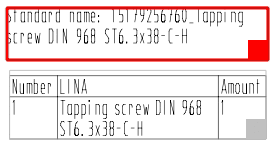
When activated, the red frame gets a square drag point.
Value range: horizontal | vertical
The following attributes MUST be assigned:
[ELEMENT_text1]
type=text
parent=frame
position_x=200.00
position_y=200.30
position_w=60.00
position_h=15.00
text=Normtext: $NT.
text_size=5.00
width_factor=0.50
translatable=false
text_align=left
sizeable=true
rotation=horizontal
translateable=false
![[Note]](images/note.png)