7.9.
Docking window "Sketcher "
7.9.5.
Docking window "
Edit
element"
|  |
| Prev | Next |
As soon as a construction step has been carried out in the Sketcher (for example, adding a line), the corresponding input fields are displayed in the Tool docking window (here with the current label Edit element ).
You can also manually select an element in the sketch history [Sketch history] or in the Sketcher at any time to call up the dialog and change parameters if necessary.
Clicking on the button button, changes are not taken into account.
If the Apply changes automatically [Automatically apply changes] checkbox is activated, every valid change is saved automatically (but can still be undone [Delete step [Delete step]
 or Undo
 ]).
]).
If the checkbox is not activated, an button is displayed and changes are only applied after the button is pressed.
The default position of the Tool docking window is top right in the same area as the Variable Manager. Another practical position is below the sketch history [Sketch history] (although this may require scrolling). Determine the position that you find most convenient.
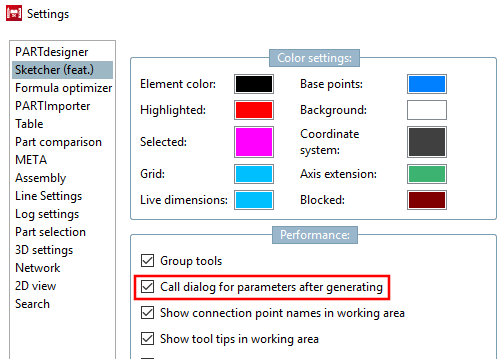
If you would like to restore the old V11 behavior, you can do this in the PARTdesigner under Extras menu [Extras] -> Settings [Settings...]... -> Sketcher (hist.) [Sketcher (feat.)] -> Behavior [Performance] by activating the option Call parameter dialog after object creation [Call dialog for parameters after generating].
![[Note]](images/note.png)
!["Tool [Tool] " docking window (here with the current label " Edit element ")](resources/img/img_5725aab2292b4e14a80548d19c278c3d.png)