7.8.13.4. Type "Value range variable " combined with IF condition (characteristic algorithm )
7.8.13.4.2. IF condition:
Default value "Forced" or "Standard"
|  |
| Prev | Next |
7.8.13.4. Type "Value range variable " combined with IF condition (characteristic algorithm )
7.8.13.4.2. IF condition:
Default value "Forced" or "Standard"
| |
| Prev | Next |
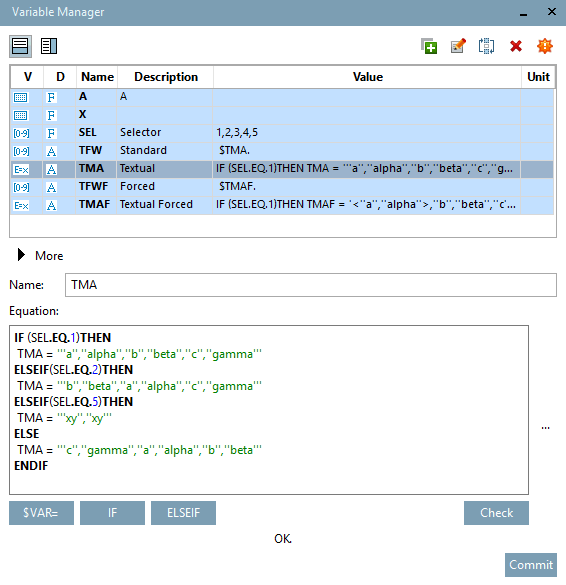
The following example shows how a value range variable (here SEL "Selector ") is used to control another value range variable, once with a standard IF condition (here TFW "Standard ") and once forced (here TFWF "Forced ").
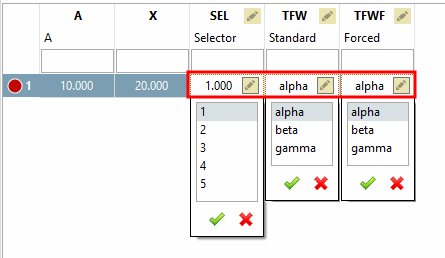
The start values are displayed when the table is loaded. The start value is represented by the first parameter set in the formula [Equation]. For the selector this is 1, for TFW (TMA) and TFWF (TMAF) the value "alpha" due to the condition set.
IF (SEL.EQ.1)THEN
 TMA = '''a'',''alpha'',''b'',''beta'',''c'',''gamma'''
ELSEIF(SEL.EQ.2)THEN
 TMA = '''b'',''beta'',''a'',''alpha'',''c'',''gamma'''
ELSEIF(SEL.EQ.5)THEN
 TMA = '''xy'',''xy'''
ELSE
 TMA = '''c'',''gamma'',''a'',''alpha'',''b'',''beta'''
ENDIF
Description of the behavior in the PARTdataManager (resp. PARTdesigner Table):
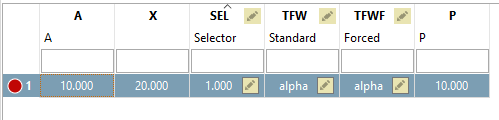
When the table is opened, selector 1 is loaded as the start value (1 is the first value under Formula [Equation] ) and thus the value "alpha" is loaded in TFW (TMA) and TFWF (TMAF) according to the condition.
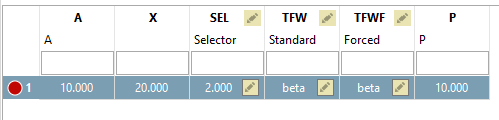
When setting the selector to 2, the values of TFW and TFWF change to "beta".
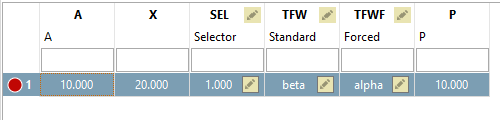
If now the selector is set to 1 again, only the value of TFWF is changed. TFW is not changed.
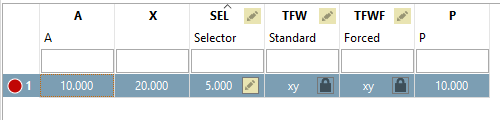
If the selector is set to 5 now, both TFW and TFWF are changed.
With selector 1 both values are changed again for the same reason.
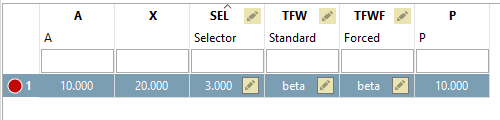
Now set TFW and FFWF manually to the value "beta" and change the selector to 3.
Result: No change, neither for TFW nor for TFWF.
When setting selector to 5 now, the new value is set.
![[Note]](images/note.png)