5.10.2.1.
Create new 2D drawing
5.10.2.1.1. Create
drawing |  |
| Prev | Next |
You have various options for creating a new 2D derivation with the sketchers.
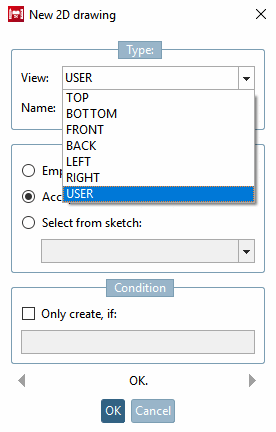
Under 3D history [3D History] in the context menu of a layer, select the command New 2D drawing.... [New 2D drawing...]
--> The New 2D drawing dialog box opens.
If you select a standard view, the name [Name] is assigned automatically.
If you have selected USER, you must assign your own name.
![[Note]](images/note.png) | Note |
|---|---|
If you selected New 2D drawing -> Type -> View -> Standard view (TOP, BOTTOM, FRONT, BACK, LEFT, RIGHT ) in the dialog box, the respective standard view is overwritten. | |
Once the desired settings have been made, confirm with .
All usual options for creating a new drawing or modifying adopted base drawings are available in the sketcher.
Via the Import sketch button
 you have the option of using an external drawing as a starting point. The following formats can be imported:
![Context menu New 2D drawing. [New 2D drawing...].](resources/img/img_74807d0f7e494af3ba158f8b255f1982.png)