5.9.
Settings
5.9.9. Tabbed page: Variable assignment (project type "Assembly table")
|  |
| Prev | Next |
The Variable assignment tab page only appears for the Assembly table project type [Project type].
At
assemblies in the PARTdataManager is also called up - after
Individual components and assembly have already been created - a project of type
"Assembly Table" ( asmtab.tac ). See under
Section 7.13.3, “Create Assembly Table Project from A to Z
”.
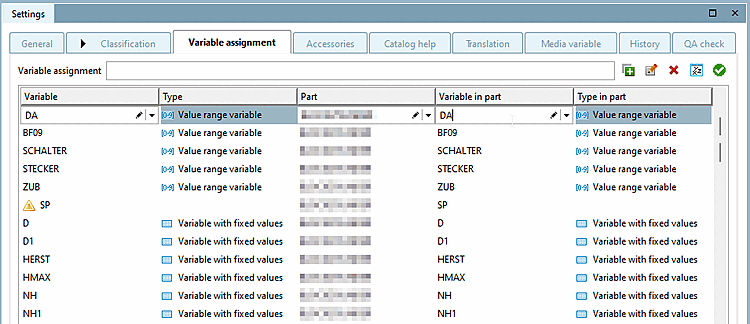
The exact assignment of variables in the assembly table and the variable in the part can be viewed and edited on the Variable assignment Tabbed page.
A search term from the variable assignment can be entered in the search line. All columns are searched, so you can not only search for variable designations, but also filter by type or component.
Next to the search bar
the five basic functions are  Add,
Add,
 Edit,
Edit,
 Remove,
 All variables
and [Add all variables]
All variables
and [Add all variables]
 variables
test [Test variables].
variables
test [Test variables].
If you click on Add, the table jumps to the last line, where there is always an empty line. You can enter Variable, Component [Part] and Variable in component [Variable in part] or select from the drop-down menu. The columns Type and Type in component [Type in part] are automatically assigned if available.
To edit an existing line, you can either double-click in the line or simply left-click to select the line and click on the Edit button.
Click on a line and press Remove to delete the variable assignment from the list. This can be added again at any time.
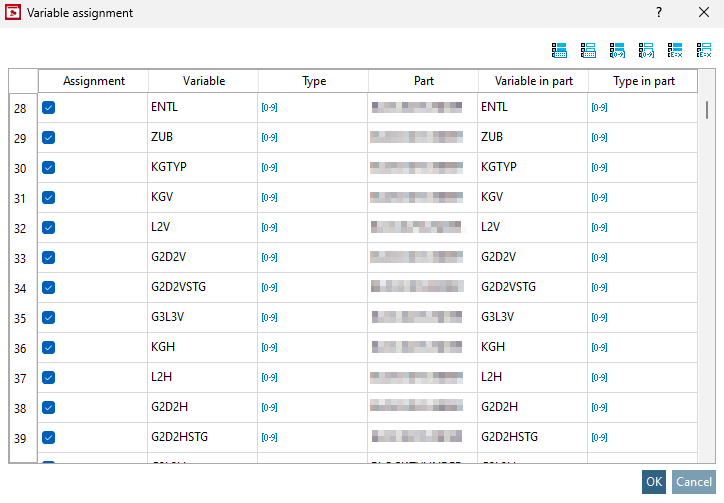
Add all variables opens the window of the same name. Once you have selected the desired component, you will be taken to the Variable assignment window.
There you have the option of assigning all available variables in the assembly table to the component using the checkbox in the Assignment column. Using the quick selection above the table, you can select All or No variables with fixed values, All or No value range variables and All or No characteristic algorithms.
You can use Test variables to check whether each row from the assembly table can be uniquely assigned to a row from the selected component using the current variable assignment. Depending on the result, you will receive feedback from the system.


![[Note]](images/note.png)