5.4.1.  Filter preselection

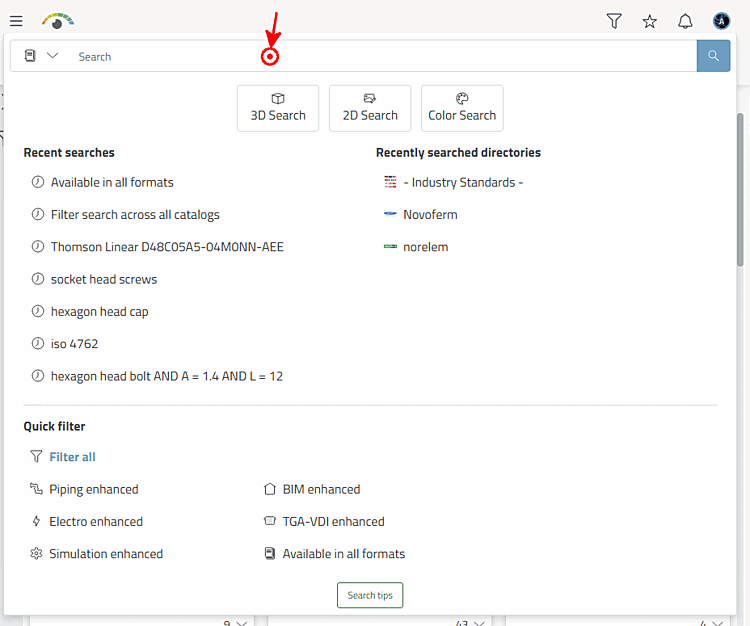
Click on the Filter icon to open a pop-up window with the preselection options Quick filter, Markets and Recently searched directories.

The figure shows an example of the results for "Filter [Filter search across all catalogs] search across all catalogs".When selecting "Filter search [Filter search across all catalogs] across all catalogs", the results are completely unspecific during the first load, but depend on the setting under $CADENAS_SETUP/partsol.cfg > FULLTEXTSEARCH > SimilarityFactor. The standard catalog is prioritized by default.

The figure shows an example of the results for "Filter [Filter search across all catalogs] search across all catalogs".[20]

As soon as a selection has been made, the Filter dialog area is displayed on the left.

When selecting Filter search across all catalogs, the initial search results are still completely unspecific; for all other selections, the catalogs corresponding to the selected category are already preselected and the search results displayed are already filtered according to the preselection.

Example 1

Example: Filter after selecting "Filter search across all catalogs [Filter search across all catalogs] "

Example: Filter after selecting "Filter search across all catalogs [Filter search across all catalogs] "

Example 2

Filters that do not correspond to the mechanical/mechanical engineering specification are already hidden and the product range is already restricted.

Example: Filter after selecting "Mechanics/Mechanical Engineering "

Example: Filter after selecting "Mechanics/Mechanical Engineering "

Whenever activating a further filter, it is immediately executed.


[20] When selecting "Filter search [Filter search across all catalogs] across all catalogs", the results are completely unspecific during the first load, but depend on the setting under $CADENAS_SETUP/partsol.cfg > FULLTEXTSEARCH > SimilarityFactor. The standard catalog is prioritized by default.